Smart Thermostat Buying Guide: What to Know Before You Upgrade
Quick Comparison
| Product | Best For | Buy |
|---|---|---|
 Google Nest Learning Thermostat, 4th Gen (Best Overall) Google · 24V HVAC (C-wire optional) · 6.9 oz (with base) | Homeowners who want a thermostat that builds its own schedule | |
 Sensi Touch 2, ST76 (Best Value) Copeland (formerly Emerson Sensi) · 24V HVAC (C-wire required) · 5.6 oz | Value-conscious buyers who want a premium touchscreen experience |
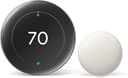
Google Nest Learning Thermostat, 4th Gen (Best Overall)
Homeowners who want a thermostat that builds its own schedule
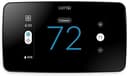
Sensi Touch 2, ST76 (Best Value)
Value-conscious buyers who want a premium touchscreen experience
A smart thermostat is one of the simplest upgrades you can make to your home, and one of the few that actually pays for itself. I think every homeowner should consider this swap. Unlike a standard programmable thermostat that runs on a fixed schedule you probably never set up, a smart thermostat learns your habits, detects when you leave, and adjusts heating and cooling automatically. This smart thermostat buying guide will help you navigate the options and avoid costly mistakes.
Here's the truth most people miss when shopping for a smart thermostat: the "smart" features matter far more than the hardware. A sleek touchscreen means nothing if the thermostat can't talk to your HVAC system or doesn't support your preferred voice assistant. the features, compatibility requirements, and ecosystem decisions are what actually determine whether you'll love or regret your purchase.
Whether you're replacing a basic dial thermostat or upgrading from a programmable model, this guide covers everything you need to make a confident choice. I'll skip the marketing fluff and focus on what genuinely affects your comfort, savings, and daily experience.
How Smart Thermostats Save You Money
The biggest selling point of a smart thermostat is energy savings, and the data backs it up. According to the EPA's ENERGY STAR program, certified smart thermostats save an average of 8% on heating and cooling bills, which works out to roughly $50 per year for the typical American household. That means most smart thermostats pay for themselves within two to four years.
But that 8% figure is just the average. Your actual savings depend on several factors:
- Climate. Homes in extreme climates (very hot summers or very cold winters) spend more on heating and cooling, so the percentage savings translate to bigger dollar amounts.
- Your current habits. If you already manually adjust your thermostat before leaving and before bed, you'll see smaller gains. If you leave it at 72 all day every day, the savings will be dramatic.
- Occupancy patterns. Households where everyone leaves for work and school see the biggest benefit from auto-away features and geofencing.
- HVAC system efficiency. An older, less efficient system paired with a smart thermostat still wastes energy. The thermostat optimizes runtime, but it can't fix a leaky duct or a failing compressor.
The key insight is that smart thermostats save energy by reducing waste, not by making you uncomfortable. They learn when you're home, when you're away, and when you're sleeping, then adjust accordingly. A well-configured smart thermostat runs your system less while keeping you just as comfortable during the hours that matter.
Nearly half of the average American energy bill goes toward heating and cooling, totaling over $900 per year. Even modest optimization of that spend adds up quickly.
Smart Thermostat Buying Guide: Key Features to Look For
Not every smart thermostat offers the same capabilities. In my opinion, the features below are what separate a genuinely useful thermostat from one that's just a programmable model with Wi-Fi.
Learning and Adaptive Scheduling
The best smart thermostats build a schedule for you. The Google Nest Learning Thermostat, for example, observes your manual adjustments over the first week or two and then creates an automatic schedule based on your preferences. Other models like the ecobee use a combination of occupancy detection and your input to build optimized schedules.
This matters because most people never program their programmable thermostats. I'd pick a learning thermostat over a basic programmable model every time because it removes that friction entirely. You just use it normally for a few days, and it figures out the rest.
Geofencing
Geofencing uses your phone's GPS to detect when you leave home and when you return. When everyone in the household leaves the geofenced area, the thermostat switches to an energy-saving away mode. When someone crosses back into the zone, it starts pre-conditioning so the house is comfortable when you walk in.
What I like most about geofencing is that it handles the most common source of wasted energy: heating or cooling an empty house. Unlike a fixed schedule, geofencing adapts to your real daily patterns, even on days when your routine changes.
Remote Room Sensors
Standard thermostats read the temperature in one location, usually a hallway. That single reading often doesn't reflect the actual temperature in the rooms where you spend your time. Remote room sensors (included with ecobee models and available as add-ons for others) measure temperature and occupancy in multiple rooms.
With room sensors, the thermostat can prioritize the bedroom at night and the living room during the day. It can also average readings across rooms instead of relying on that one hallway reading. If you have a multi-story home or rooms that run hotter or cooler than the rest of the house, I recommend prioritizing a thermostat with room sensor support. They make a real difference.
Humidity Control
Some smart thermostats can monitor and manage indoor humidity by controlling your HVAC system's fan or by working with a whole-house humidifier or dehumidifier. This is especially valuable in humid climates where running the AC a bit longer (to dehumidify) improves comfort more than dropping the temperature another degree.
Energy Reports and Usage Tracking
Most smart thermostats provide monthly or weekly energy reports showing how much your system ran, what temperatures you maintained, and how your usage compares to previous periods. These reports help you identify patterns and make smarter decisions. Some models, like the ecobee, even show how much energy you saved compared to a baseline.
Air Quality and Filter Reminders
Higher-end models monitor air quality metrics and remind you when it's time to change your HVAC filter. A clogged filter forces your system to work harder, so timely reminders protect both efficiency and equipment life.
Compatibility: Will It Work With Your HVAC System?
Before you buy any smart thermostat, you need to confirm compatibility with your existing HVAC setup. No smart thermostat buying guide would be complete without this section, because this is the step most people skip and the one that causes the most returns.
System Types
Smart thermostats work with most common residential HVAC systems, including:
- Forced air (central heat and AC): Compatible with virtually all smart thermostats. This is the most common setup.
- Heat pumps: Supported by most smart thermostats, but check for heat pump-specific features like auxiliary heat lockout and balance point settings.
- Radiant/boiler systems: Limited compatibility. Some smart thermostats support boiler systems with on/off control, but many do not. The Nest and ecobee both work with many radiant setups, but you'll need to verify your specific wiring.
- Multi-zone systems: Supported, but each zone needs its own thermostat. If you have a two-zone system, you'll buy two smart thermostats.
- High-voltage systems (baseboard heaters): Most smart thermostats do not support 120V or 240V line-voltage systems. You'll need a specialized line-voltage smart thermostat like the Mysa or Sinope for baseboard heaters.
Wiring Check
Your existing thermostat wiring determines compatibility. Pull off your current thermostat cover and look at the wires connected to the terminal strip. Common wires include:
- R (Rh/Rc): Power (red wire). Every system has this.
- W (W1/W2): Heating stages.
- Y (Y1/Y2): Cooling stages.
- G: Fan control.
- C: Common wire (the important one, more on this below).
- O/B: Reversing valve for heat pumps.
Most smart thermostat manufacturers offer an online compatibility checker on their websites. Enter your wire labels, and the tool tells you whether the thermostat will work. Run this check before you purchase, not after.
Smart Home Ecosystems: Alexa vs Google vs Apple HomeKit
Your choice of smart thermostat locks you into (or out of) certain ecosystems. Here's how the major platforms compare for thermostat control.
Amazon Alexa
Nearly every smart thermostat on the market works with Alexa. Voice commands like "Alexa, set the thermostat to 70" work seamlessly through any Echo device. If you're building an Alexa-based smart home, thermostat compatibility is almost guaranteed. The Amazon Smart Thermostat is the deepest Alexa integration available, but it sacrifices cross-platform flexibility.
Google Home / Google Assistant
Google's ecosystem pairs naturally with the Nest thermostat line, but most major brands (ecobee, Honeywell, Sensi) also support Google Home. Voice control through Google Home speakers and Nest Hub displays works well. The Nest Learning Thermostat (4th Gen) offers the tightest Google integration, including energy monitoring within the Google Home app.
Apple HomeKit
HomeKit compatibility is the most limited. Ecobee has long been the best HomeKit thermostat thanks to its native integration (not relying on Matter bridging). The Nest Learning Thermostat (4th Gen) added Apple Home support through Matter firmware updates, and some Honeywell and Sensi models also support HomeKit. If you're an Apple household with HomePods and iPhones, confirm HomeKit support before purchasing.
The Matter Standard
Matter is the newer universal smart home protocol designed to end ecosystem lock-in. A Matter-compatible thermostat should work with Alexa, Google Home, and Apple Home regardless of brand. As of 2026, Google Nest and Honeywell have shipped Matter-compatible thermostats, while ecobee uses native HomeKit integration instead. Matter is still maturing, so native app control remains the most feature-rich option for now.
The bottom line: If you use multiple ecosystems or might switch in the future, choose a thermostat that supports all three major platforms. I recommend ecobee and Sensi as the most cross-platform friendly options. If you're committed to one ecosystem, lean toward the brand that integrates most deeply (Nest for Google, ecobee for Apple, Amazon Smart Thermostat for Alexa).
What About the C-Wire?
The C-wire (common wire) is the single most common installation concern with smart thermostats, and it trips up a lot of buyers. Here's what you need to know.
What the C-Wire Does
The C-wire provides continuous 24-volt power to your thermostat. Older thermostats didn't need it because they ran on tiny amounts of power (or batteries). Smart thermostats, with their Wi-Fi radios, touchscreens, and sensors, draw significantly more power and need a steady supply.
Without a C-wire, your smart thermostat might experience intermittent Wi-Fi disconnects, screen flickering, or complete power loss. Some thermostats try to "steal" power from other wires, but this can cause HVAC system issues like short cycling (your furnace turning on and off rapidly).
How to Check If You Have One
Pull your current thermostat off the wall and look at the wires connected to the terminals. If you see a wire labeled "C" (usually blue, but not always), you have a C-wire. If you only see R, W, Y, and G wires (four wires total), you likely don't have one.
Even if you don't see a C-wire connected, check inside the wall. Sometimes a fifth wire was run to the thermostat location but left unused and tucked behind the wall plate. Also check your furnace or air handler end. If a spare wire is connected to the C terminal on the control board, you just need to connect it at the thermostat end.
Solutions If You Don't Have a C-Wire
You have several options:
- Ecobee Power Extender Kit. Ecobee thermostats ship with a Power Extender Kit that installs at your furnace and provides C-wire functionality without running new wire. This is the cleanest no-C-wire solution.
- Nest Power Connector. The Google Nest Learning Thermostat (4th Gen) includes a C-wire adapter for systems that lack one. Older Nest models used power-stealing technology, which worked for many systems but caused issues with some.
- Add-a-wire adapter (Venstar ACC0410). This third-party adapter repurposes an existing wire to act as a C-wire. It installs at the furnace and works with most smart thermostats.
- Run a new wire. If your thermostat location is accessible, an electrician can run a new thermostat cable with a C-wire. This costs $100 to $200 in most cases and is the most permanent fix.
For most homeowners, the included adapters from ecobee or Nest are the simplest path. In my opinion, the ecobee Power Extender Kit is the most elegant solution because it ships right in the box. If you're uncomfortable working with HVAC wiring, hire an HVAC technician. The installation typically takes 30 to 60 minutes and costs $75 to $150 for labor.
Smart Thermostat Installation Tips
Most smart thermostats are designed for DIY installation, and the process is straightforward if your wiring is compatible. Here are a few tips to make it go smoothly.
- Take a photo of your current wiring before disconnecting anything. Label each wire if the colors don't match standard conventions.
- Turn off power at the breaker before removing your old thermostat. Working with live 24V wiring won't electrocute you, but it can short your HVAC control board.
- Use the manufacturer's app during installation. Both Nest and ecobee have step-by-step guided installations in their apps that walk you through each wire connection.
- Test all modes after installation: heating, cooling, and fan. Don't assume it works just because the screen turns on. Run each mode for a few minutes to verify.
- Set up geofencing and sensors after the basic installation is complete. These features require additional configuration in the app.
Common Questions
Do smart thermostats work without Wi-Fi?
Yes. Without Wi-Fi, you lose remote control, voice commands, and learning features, but the thermostat still functions as a basic programmable thermostat. If your internet goes down temporarily, your heating and cooling schedule continues running.
Can I install a smart thermostat myself?
Most homeowners can handle the installation in 30 minutes or less. The process involves removing your old thermostat, connecting labeled wires to the new base plate, and following the app setup. If your wiring is unusual or you need a C-wire adapter installed at the furnace, consider hiring a professional.
How long do smart thermostats last?
Most smart thermostats are designed to last 10 years or more. The hardware is solid. The bigger risk is software support. Choose a thermostat from a major brand (Google, ecobee, Honeywell) that's likely to continue providing firmware updates and app support for years.
Will a smart thermostat work with my old furnace?
In most cases, yes. Smart thermostats control your HVAC system through the same low-voltage wiring that any standard thermostat uses. Age of the furnace doesn't matter as long as it uses standard 24V control wiring. The exceptions are high-voltage systems (baseboard heaters) and some proprietary systems from brands like Carrier Infinity or Trane ComfortLink that require brand-specific thermostats.
Is the Nest Learning Thermostat worth the extra cost over the basic Nest?
The Learning Thermostat (4th Gen) adds a larger display, learning algorithms, a built-in temperature sensor for Soli-based presence detection, and a C-wire adapter in the box. If you want set-it-and-forget-it automation, the learning features justify the price. If you prefer to build your own schedule manually, the standard Nest Thermostat at a lower price does the job.
Our Top Recommendation
If you want specific product picks with detailed comparisons, head over to our best smart thermostats roundup. I compared the top models across price, features, ecosystem support, and ease of installation to help you narrow down the right one.
Upgrading your thermostat pairs well with other smart home improvements. A smart lock adds keyless entry and remote access, and a smart ceiling fan with thermostat integration can further reduce cooling costs by circulating air more efficiently.
Recommended Products
Ready to buy? These are the top picks from our best smart thermostat guide.
Google Nest Learning Thermostat, 4th Gen (Best Overall)
Google Nest Learning Thermostat, 4th Gen (Best Overall)
Homeowners who want a thermostat that builds its own schedule
Pros
- Genuine learning algorithm builds your schedule automatically
- Matter support works with every major smart home platform
- Included temperature sensor for multi-room monitoring
- No C-wire required in most installations
Cons
- At $280, it is the most expensive option in this roundup
- Learning takes 1-2 weeks to optimize, which can feel inconsistent at first
- Remote sensors sold separately beyond the one included
Sensi Touch 2, ST76 (Best Value)
Sensi Touch 2, ST76 (Best Value)
Value-conscious buyers who want a premium touchscreen experience
Pros
- Best-looking touchscreen display in this price range
- Backed by Copeland's 100+ years of HVAC expertise
- Flexible 7-day scheduling with geofencing
- Estimated 23% energy savings
Cons
- C-wire strictly required (no adapter or workaround)
- No Apple HomeKit support
- Room sensors cost extra and are a newer addition
Final Thoughts
This smart thermostat buying guide boils down to three decisions: features, compatibility, and ecosystem. Get those three right, and you'll have a thermostat that saves money, keeps you comfortable, and integrates smoothly into your daily routine.
Start with compatibility. Check your HVAC system type and wiring (especially the C-wire) before you fall in love with a specific model. Then choose your ecosystem. If you're deep into Alexa, Google, or Apple HomeKit, pick the thermostat that integrates best with what you already own. Finally, prioritize the features that match your lifestyle: geofencing for busy households, room sensors for multi-story homes, and learning algorithms for anyone who doesn't want to build a schedule by hand.
I think the 8% average savings on heating and cooling may sound modest, but it's consistent, automatic, and compounds year after year. A $200 smart thermostat that saves $50 annually is one of the best return-on-investment upgrades you can make to your home. Stop overpaying to heat and cool rooms nobody is using, and let a smart thermostat handle it for you. Having walked through this smart thermostat buying guide, you have everything you need to make a confident purchase.
Affiliate Disclosure
This post contains affiliate links. As an Amazon Associate, HomeBuildLab earns from qualifying purchases at no additional cost to you. Learn more
Looking for the right tools and products?
Check out our product reviews and buying guides to find the best gear for your project.
Browse Reviews