Surge Protector vs Power Strip: What's the Difference (And Why It Matters)
Quick Comparison
| Product | Best For | Buy |
|---|---|---|
 APC Performance SurgeArrest P12U2 (Best Overall) APC (Schneider Electric) · N/A · 2.2 lbs | Home offices and entertainment centers that need maximum outlet count and top-tier protection | |
 Amazon Basics 12-Outlet Surge Protector (Best Value) Amazon Basics · N/A · 1.8 lbs | Budget-conscious buyers who want high joule protection without overspending |
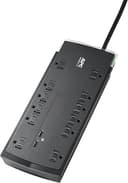
APC Performance SurgeArrest P12U2 (Best Overall)
Home offices and entertainment centers that need maximum outlet count and top-tier protection
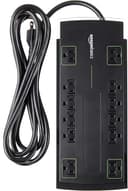
Amazon Basics 12-Outlet Surge Protector (Best Value)
Budget-conscious buyers who want high joule protection without overspending
They look almost identical sitting on a shelf. They both add extra outlets. They both have an on/off switch and a power cord. But the surge protector vs power strip difference could mean the difference between a working laptop and a fried motherboard. I think this is one of the most overlooked distinctions in home electronics, and it cost me a router before I started paying attention.
Here is the truth most people miss: a basic power strip does absolutely nothing to protect your electronics. It is just a glorified extension cord with extra outlets. A surge protector, on the other hand, contains internal components that absorb dangerous voltage spikes before they reach your gear. Understanding the surge protector vs power strip distinction is one of the simplest ways to protect thousands of dollars in electronics.
From what I have seen about how each device works and where they differ, let me break down exactly when you need each one, and how to tell which one you already own.
Quick Answer
Use a surge protector for anything with a circuit board: computers, TVs, gaming consoles, routers, and smart home devices. Use a power strip for simple, low-value items like lamps, fans, and phone chargers. If you are unsure, default to a surge protector. The price difference is small, but the protection difference is massive.
Key Differences at a Glance
Feature: Primary function | Surge Protector: Protects devices from voltage spikes | Power Strip: Adds extra outlets
Feature: Surge protection | Surge Protector: Yes (via MOVs) | Power Strip: None
Feature: Joule rating | Surge Protector: 600 to 4,000+ joules | Power Strip: 0 joules
Feature: Clamping voltage | Surge Protector: 330V to 500V (lower is better) | Power Strip: N/A
Feature: Indicator light | Surge Protector: Yes (shows protection status) | Power Strip: Power on/off only
Feature: UL listing | Surge Protector: UL 1449 (surge protection) | Power Strip: UL 1363 (relocatable power tap)
Feature: Price range | Surge Protector: $15 to $60 | Power Strip: $5 to $15
Feature: Lifespan | Surge Protector: Degrades with each surge absorbed | Power Strip: Lasts until physically damaged
Feature: Best for | Surge Protector: Electronics, computers, TVs | Power Strip: Lamps, fans, simple appliances
What Is a Surge Protector?
A surge protector is a device that shields your electronics from sudden spikes in electrical voltage. These spikes (called transients or surges) can come from lightning strikes, power grid fluctuations, or even large appliances cycling on and off in your home.
Inside every surge protector are components called metal oxide varistors (MOVs). Under normal conditions, MOVs do nothing. But when voltage exceeds a set threshold, they activate and redirect the excess energy to the ground wire, keeping it away from your plugged-in devices.
Key Specs to Understand
Joule rating measures how much total energy the surge protector can absorb over its lifetime. Think of it like a sponge: every surge it absorbs uses up some of its capacity. A 2,000-joule surge protector can handle more cumulative surges than a 600-joule model. For computers and home theater setups, look for at least 2,000 joules. For basic electronics like a router or smart speaker, 1,000 joules is adequate.
Clamping voltage is the voltage level that triggers the MOVs to kick in. Lower is better. The UL standard defines three levels: 330V, 400V, and 500V. A 330V clamping voltage provides the tightest protection and is ideal for sensitive electronics. Anything above 400V offers weaker protection per surge event.
Here is a detail most people overlook, and I think it is the single most important spec to understand: clamping voltage matters more than joule count. A surge protector with 330V clamping and 1,500 joules provides better protection than one with 500V clamping and 3,000 joules. The lower clamping voltage catches surges earlier, before they have a chance to stress your equipment.
What Is a Power Strip?
A power strip is simply a block of electrical outlets attached to a flexible cord and plug. It takes one wall outlet and turns it into four, six, or eight outlets. That is all it does.
There is no internal circuitry to detect voltage spikes. No MOVs. No joule rating. A power strip passes electricity straight through to whatever is plugged into it, surges and all. If a 1,000-volt spike travels down the line, every device plugged into your power strip gets hit with that full spike.
Power strips are perfectly fine for devices that do not contain sensitive electronics. A floor lamp, a box fan, a simple space heater (within the strip's amperage rating). These devices can handle minor voltage fluctuations without damage. But plugging a $1,500 gaming PC into a basic power strip is a gamble you should not take.
Surge Protector vs Power Strip: Head-to-Head Breakdown
Protection Level
This is the only category that truly matters, and it is not close. A surge protector actively defends your devices. A power strip offers zero protection. In my opinion, if your area experiences frequent thunderstorms, sits near industrial equipment, or has older wiring, surge protection is not optional for your electronics.
Price
A decent power strip costs $5 to $15. A solid surge protector runs $15 to $40 for most home applications, with premium models reaching $50 to $60. That is a $10 to $25 difference to protect equipment worth hundreds or thousands of dollars. I think the math here is about as simple as it gets in home electronics.
Lifespan
Power strips last essentially forever, or at least until the cord frays or a switch breaks. Surge protectors, however, have a finite lifespan measured in joules absorbed, not years on the shelf. Every surge they absorb depletes their MOVs slightly. After enough surges, the MOVs are spent and the device becomes nothing more than a regular power strip.
Indicator Lights
Most surge protectors include a "Protected" or "Grounded" indicator light. When this light is on, the MOVs are still functional. When it goes off (or turns red, depending on the model), your surge protection is depleted and the unit needs replacement. Basic power strips only have a simple power-on light that tells you nothing about protection status.
Failure Mode
When a power strip fails, it just stops working. When a surge protector fails, it can fail in two ways. Some models shut off completely when protection is depleted (called "fail-safe"), which forces you to notice and replace it. Others continue passing power but without any surge protection (called "fail-open"), which is more dangerous because you might assume you are still protected. I'd pick a fail-safe model every time. The minor inconvenience of losing power is nothing compared to unknowingly running unprotected for months.
Which Devices Need Surge Protection?
Definitely use a surge protector for:
- Desktop computers and monitors
- Laptops (when plugged into a charger)
- TVs and streaming devices
- Gaming consoles (PS5, Xbox, Nintendo Switch dock)
- Routers, modems, and network switches
- Smart thermostats with wired power adapters
- Home theater receivers and soundbars
- NAS drives and external hard drives
- Printers and scanners
A basic power strip is fine for:
- Table lamps and floor lamps
- Box fans and simple space heaters
- Phone chargers (though surge protection does not hurt)
- Electric kettles and coffee makers
- Hair dryers and curling irons
The general rule: if it has a microprocessor, it needs surge protection. voltage spikes can corrupt data, damage circuit boards, and shorten the lifespan of sensitive components even when the spike is not large enough to cause immediate failure.
How to Tell If Your "Surge Protector" Is Actually Just a Power Strip
This is one of the most common mix-ups in home electronics. Many people assume anything with multiple outlets and a power switch is a surge protector. It is not. Here is how to check.
Look for a joule rating. Flip the device over and read the label. A surge protector will list a joule rating (e.g., "1080 Joules" or "2160 Joules"). If there is no joule rating, it is a power strip.
Check the UL listing number. A UL 1449 listing means it is a certified surge protective device. A UL 1363 listing means it is a relocatable power tap, which is a fancy name for a power strip. This is the most reliable indicator.
Look for indicator lights labeled "Protected" or "Grounded." These are specific to surge protectors. A simple "On" light does not count.
Check the price you paid. If you bought it for $5 at a dollar store, it is almost certainly just a power strip. Genuine surge protection requires internal components that cost more to manufacture.
When to Replace Your Surge Protector
Surge protectors do not last forever, and this is the part most people get wrong. They treat them like power strips, leaving them plugged in for a decade and assuming everything is fine.
Replace immediately if:
- The "Protected" indicator light is off or has turned red
- You have experienced a direct lightning strike or major power event
- The unit is visibly damaged, discolored, or warm to the touch
Replace proactively every 3 to 5 years even if the indicator light is still on. MOVs degrade gradually with small surges you may never notice. Your home experiences dozens of minor voltage fluctuations per year from HVAC systems cycling, appliances turning on, and grid-level switching. These small events chip away at the joule capacity without triggering any visible warning.
Consider upgrading if your current model has fewer than 1,000 joules or a clamping voltage above 400V. Older surge protectors from five or ten years ago often have lower specs than what is available today at the same price point. For our top picks with current joule ratings and pricing, check out our best surge protectors roundup.
Our Recommendation
For most homes, every outlet powering a computer, TV, or smart device should have a surge protector. This is not about being overly cautious. It is about spending $20 to $30 to protect $500 to $2,000 worth of electronics. What I like most about modern surge protectors is that you get solid 2,000+ joule protection for under $30, which was not the case even five years ago.
If you are setting up a home office, pair a quality surge protector with your desk setup. If you are building out a smart home with devices like a smart thermostat or smart lock hub, make sure the central hub and router are on a surge protector, not a basic power strip.
For rooms where you only need to plug in a lamp and a phone charger, a power strip is fine. No need to over-engineer it.
Recommended Products
Ready to buy? These are the top picks from our best surge protector guide.
APC Performance SurgeArrest P12U2 (Best Overall)
APC Performance SurgeArrest P12U2 (Best Overall)
Home offices and entertainment centers that need maximum outlet count and top-tier protection
Pros
- 4,320 joules is among the highest consumer ratings available
- 330V clamping voltage (tightest UL tier)
- $300,000 connected equipment warranty backs up the protection claims
- 12 outlets with 4 widely spaced for adapters
Cons
- USB ports are USB-A only (no USB-C)
- 6-foot cord is adequate but not generous
- Bulkier than some competitors
Amazon Basics 12-Outlet Surge Protector (Best Value)
Amazon Basics 12-Outlet Surge Protector (Best Value)
Budget-conscious buyers who want high joule protection without overspending
Pros
- 4,320 joules matches premium competitors at a fraction of the price
- 8-foot cord is longer than most in this class
- Sliding outlet covers keep dust and debris out
- Fireproof MOV construction
Cons
- No USB ports
- Limited warranty compared to APC, Belkin, or Tripp Lite
- No indicator light for surge protection status on some versions
Final Thoughts
The surge protector vs power strip question comes down to one thing: do the devices you are plugging in contain electronics you care about? If yes, use a surge protector. If no, a power strip gets the job done. In my opinion, this is one of the easiest and cheapest upgrades you can make for your home electronics setup.
The visual similarity between these two products is exactly what makes this distinction so important. They look the same, sit in the same aisle at the hardware store, and often get used interchangeably. But one absorbs voltage spikes while the other just passes them straight through to your gear.
I'd recommend checking the label on every multi-outlet device in your home today. If it does not list a joule rating or carry a UL 1449 certification, your electronics are not protected. Swap it out for a proper surge protector, set a reminder to replace it in three to five years, and stop worrying about the next power surge.
Affiliate Disclosure
This post contains affiliate links. As an Amazon Associate, HomeBuildLab earns from qualifying purchases at no additional cost to you. Learn more
Looking for the right tools and products?
Check out our product reviews and buying guides to find the best gear for your project.
Browse Reviews