Best Smart Locks in 2026: Keyless Entry That's Actually Secure
Quick Comparison
| Product | Best For | Buy |
|---|---|---|
 Schlage Encode Plus Smart WiFi Deadbolt (Best Overall) Schlage · Battery (4 AA) · 4.5 lbs | Homeowners who want top-tier security with full smart home compatibility | |
 Ultraloq U-Bolt Pro WiFi (Best Value) U-tec (Ultraloq) · Battery (4 AA) · 3.9 lbs | Budget-conscious buyers who want fingerprint access and maximum unlock options | |
 Level Lock+ WiFi (Best for Apple Homes) Level · Battery (CR2 lithium) · 1.2 lbs | Apple ecosystem users who want invisible smart lock technology | |
 Kwikset Halo Touch (Best Fingerprint Lock) Kwikset · Battery (4 AA) · 4.2 lbs | Families who want quick fingerprint access with reliable geofencing | |
 Yale Assure Lock 2 with WiFi (Best for Rentals) Yale · Battery (4 AA) · 4.5 lbs | Rental property owners and hosts who need easy guest code management | |
 August WiFi Smart Lock, 4th Generation (Best Retrofit) August (Yale) · Battery (2 CR123) · 13 oz | Renters or anyone who wants to keep their existing exterior hardware | |
 Aqara Smart Lock U200 (Best New Release) Aqara · Rechargeable Li-ion (USB-C) + AAA backup · 14.5 oz (lock body) | Smart home enthusiasts who want Matter-over-Thread future-proofing |
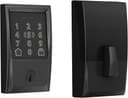
Schlage Encode Plus Smart WiFi Deadbolt (Best Overall)
Homeowners who want top-tier security with full smart home compatibility
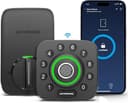
Ultraloq U-Bolt Pro WiFi (Best Value)
Budget-conscious buyers who want fingerprint access and maximum unlock options
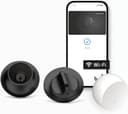
Level Lock+ WiFi (Best for Apple Homes)
Apple ecosystem users who want invisible smart lock technology
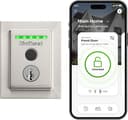
Kwikset Halo Touch (Best Fingerprint Lock)
Families who want quick fingerprint access with reliable geofencing
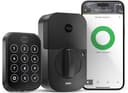
Yale Assure Lock 2 with WiFi (Best for Rentals)
Rental property owners and hosts who need easy guest code management
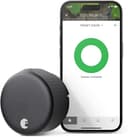
August WiFi Smart Lock, 4th Generation (Best Retrofit)
Renters or anyone who wants to keep their existing exterior hardware
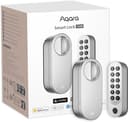
Aqara Smart Lock U200 (Best New Release)
Smart home enthusiasts who want Matter-over-Thread future-proofing
If you are shopping for the best smart lock, here is the truth most review sites won't tell you: the "smartest" lock is not always the most secure one. I have seen plenty of smart locks that prioritize flashy app features while cutting corners on the deadbolt itself. A lock with a fingerprint reader and Wi-Fi connectivity does you no good if a determined intruder can defeat the strike plate with a firm kick.
The good news is that the smart lock market has matured considerably. The best options in 2026 combine strong physical security (ANSI Grade 1 or Grade 2 certification) with genuinely useful smart features like auto-lock, remote access, and guest codes. The days of choosing between "smart" and "secure" are over, but you still need to know what to look for.
I compared seven smart locks across different price points, ecosystems, and feature sets to find the best fit for every type of homeowner. Whether you want a full deadbolt replacement with a touchscreen keypad or an invisible retrofit that hides inside your existing hardware, there is a smart lock here that fits your door and your budget.
Quick Picks: Best Smart Locks at a Glance
- Best Overall: Schlage Encode Plus. My top pick for rock-solid security with Apple Home Key, built-in Wi-Fi, and ANSI Grade AAA certification.
- Best Value: Ultraloq U-Bolt Pro WiFi. Eight unlock methods including fingerprint, ANSI Grade 1, and a price under $200.
- Best for Apple Homes: Level Lock+ WiFi. The world's smallest smart lock with Apple Home Key support and a traditional deadbolt look.
- Best Fingerprint Lock: Kwikset Halo Touch. Fast, reliable fingerprint reader with Wi-Fi and geofencing built in.
- Best for Rentals: Yale Assure Lock 2 WiFi. Easy guest code management and broad smart home compatibility.
- Best Retrofit: August WiFi Smart Lock. Installs over your existing deadbolt in minutes, keeping your exterior hardware unchanged.
- Best New Release: Aqara U200. Matter-over-Thread protocol for future-proof smart home integration with rechargeable batteries.
What to Look For in a Smart Lock
Before diving into the reviews, here are the features that actually matter when choosing a smart lock for your front door.
Connectivity: Wi-Fi vs Bluetooth vs Thread
Wi-Fi locks connect directly to your home network, allowing remote lock and unlock from anywhere through an app. This is the most convenient option, but it drains batteries faster. Schlage Encode Plus and Kwikset Halo both use built-in Wi-Fi.
Bluetooth locks only work when you are within about 30 feet. You need a separate hub or bridge for remote access. Battery life is significantly better, but the limited range can be frustrating.
Thread and Matter locks (like the Aqara U200) represent the newest protocol. Thread creates a mesh network through your smart home devices, offering the responsiveness of Bluetooth with the remote access of Wi-Fi. If you are building a new smart home ecosystem, Thread-compatible locks are worth prioritizing.
Keypad vs Fingerprint vs App-Only
Touchscreen keypads let you create unique codes for family members, guests, dog walkers, and contractors. This is the most versatile option for homes with frequent visitors. Yale and Schlage excel here.
Fingerprint readers are the fastest unlock method, typically opening in under a second. They eliminate the risk of someone shoulder-surfing your code. Ultraloq and Kwikset offer the best fingerprint implementations.
App-only locks (like the August and Level) keep your exterior hardware looking traditional but require your phone for smart features. This works well if you want a discreet setup.
Auto-Lock and Auto-Unlock
Auto-lock re-engages the deadbolt after a set time (typically 30 seconds to 5 minutes). This single feature eliminates the most common security failure: forgetting to lock the door when you leave.
Auto-unlock uses geofencing or Bluetooth proximity to unlock the door as you approach. It is convenient but can be finicky with GPS accuracy. Kwikset's implementation is among the most reliable based on user feedback.
ANSI/BHMA Security Grade
This is the specification most buyers overlook. The ANSI/BHMA grading system rates lock durability and security:
- Grade 1: Commercial-grade. Withstands 1,000,000 cycles and 360 pounds of bolt force. The Ultraloq U-Bolt Pro WiFi is the standout here.
- Grade 2: Residential security. Withstands 400,000 cycles and 150+ pounds of bolt force. Yale Assure Lock 2 carries this rating.
- Grade AAA: Schlage and Kwikset use the newer AAA rating system, which tests across three categories (security, durability, and finish). A AAA rating meets or exceeds Grade 1 in most tests.
If security is your primary concern, insist on Grade 1 or Grade AAA.
Smart Home Ecosystem Compatibility
Most smart locks work with Alexa and Google Assistant. Apple HomeKit support is less common but available on the Schlage Encode Plus, Level Lock+, Yale Assure Lock 2, and Aqara U200. If you use Apple Home Key (tapping your iPhone or Apple Watch to unlock), your options narrow to the Schlage Encode Plus, Level Lock+, Yale Assure Lock 2 Plus, and Aqara U200.
Check your existing smart home setup before buying. A lock that integrates with your smart thermostat and garage door opener creates useful automations, like unlocking the front door when the garage door opens, or adjusting the thermostat when you lock up and leave.
Our Top Picks
Schlage Encode Plus Smart WiFi Deadbolt (Best Overall)
Schlage Encode Plus Smart WiFi Deadbolt (Best Overall)
Homeowners who want top-tier security with full smart home compatibility
Pros
- ANSI/BHMA Grade AAA certification for top-tier physical security
- Apple Home Key, Alexa, and Google Assistant compatibility
- Built-in Wi-Fi with no hub required
- 100 access codes with scheduling
Cons
- Premium price at ~$299
- Bulkier interior escutcheon than some competitors
- Wi-Fi can drain batteries faster with weak signal
The Schlage Encode Plus is the smart lock I recommend to most people, and for good reason. It combines Schlage's legendary physical security (ANSI/BHMA Grade AAA) with the most comprehensive smart feature set available. Built-in Wi-Fi means no hub or bridge required. You get remote access, lock history, and up to 100 unique access codes right out of the box.
What sets the Encode Plus apart is Apple Home Key support. Tap your iPhone or Apple Watch against the lock and it opens instantly, even when your phone battery is low (thanks to power reserve on iPhone XS and later). It also works with Alexa, Google Assistant, and the Schlage Home app, making it the most ecosystem-flexible lock in this roundup.
The touchscreen keypad is responsive and features a built-in alarm (approximately 85 dB) that triggers on tampering attempts. The encrypted Wi-Fi connection adds a layer of digital security that cheaper locks lack. Battery life runs 6 to 12 months on four AA batteries depending on usage and Wi-Fi signal strength.
Ultraloq U-Bolt Pro WiFi (Best Value)
Ultraloq U-Bolt Pro WiFi (Best Value)
Budget-conscious buyers who want fingerprint access and maximum unlock options
Pros
- ANSI Grade 1 certification at under $200
- Eight unlock methods including fast fingerprint reader
- IP65 waterproof rating for exposed doors
- Built-in Wi-Fi with door sensor included
Cons
- App interface could be more intuitive
- Fingerprint reader placement feels slightly low for taller users
- No Apple HomeKit support
The Ultraloq U-Bolt Pro WiFi packs more unlock methods into a single lock than anything else on this list, and I think the sheer versatility makes it an incredible value. You get fingerprint scanning, a backlit keypad, smartphone app, auto-unlock via geofencing, mechanical key backup, eKey sharing, and voice control through Alexa and Google Assistant. That is eight ways to open your door, which means you are never locked out.
The fingerprint reader is the real highlight. It stores up to 100 fingerprints and unlocks in 0.3 seconds with 99.9% accuracy according to the manufacturer. In user reviews, the speed and reliability of the fingerprint sensor are consistently praised, even in cold weather.
The ANSI Grade 1 certification is rare at this price point. The zinc alloy construction and IP65 waterproof rating mean this lock can handle rain, snow, and temperature extremes. The included door sensor adds DoorSense functionality, alerting you when the door is left ajar.
Battery life is approximately 12 months under normal use, which is impressive given the built-in Wi-Fi. The lock also supports a 9V battery emergency backup if the main batteries die while you are away.
Level Lock+ WiFi (Best for Apple Homes)
Level Lock+ WiFi (Best for Apple Homes)
Apple ecosystem users who want invisible smart lock technology
Pros
- Invisible smart lock design preserves exterior aesthetics
- Apple Home Key with power reserve support
- Up to 12 months battery life on one CR2 battery
- Works with existing deadbolt hardware
Cons
- No built-in keypad or fingerprint reader
- Premium price at ~$329
- Limited unlock methods without optional accessories
The Level Lock+ WiFi is the smart lock for people who do not want their home to look like it has a smart lock, and I have to say, the engineering behind it is genuinely impressive. All of the technology hides inside the deadbolt itself, leaving your exterior hardware looking completely traditional. From the outside, nobody can tell it is a connected lock. That is a genuine security advantage, as burglars cannot identify it as a target for electronic attacks.
Apple Home Key support is the primary draw here. Tap your iPhone or Apple Watch and the door unlocks. The WiFi model adds remote access so you can lock and unlock from anywhere through the Apple Home app or the Level app. It also works with Alexa and Google Assistant for voice control.
The trade-off for that minimal design is fewer unlock methods. There is no keypad and no fingerprint reader on the lock itself. You rely on the app, Apple Home Key, or a physical key. Level sells an optional keypad accessory if you want code-based entry.
Battery life is exceptional, with up to 12 months on a single CR2 battery. The compact internal design is remarkably efficient with power, far outlasting Wi-Fi locks with larger battery packs.
Kwikset Halo Touch (Best Fingerprint Lock)
Kwikset Halo Touch (Best Fingerprint Lock)
Families who want quick fingerprint access with reliable geofencing
Pros
- Fast, accurate fingerprint reader with 100-fingerprint capacity
- ANSI/BHMA Grade AAA security certification
- SmartKey re-key technology for easy key changes
- Reliable geofencing for auto-lock and auto-unlock
Cons
- No Apple HomeKit or Home Key support
- Fingerprint reader can struggle with very wet or dirty fingers
- App is functional but not the most polished interface
The Kwikset Halo Touch puts a fingerprint reader front and center, making it the fastest way to get through your front door. Place your finger on the reader, and the deadbolt retracts. No codes to remember, no phone to pull out. It stores up to 100 fingerprints across 50 user profiles, which is plenty for a large family plus regular visitors.
Built-in Wi-Fi means you get remote access, lock history, and smart home integration without a separate hub. The Kwikset app handles user management, scheduling, and notifications. Alexa and Google Assistant support adds voice control. The geofencing feature (auto-unlock when you approach, auto-lock when you leave) is among the most reliable I have seen based on user reviews.
The ANSI/BHMA Grade AAA certification puts the Halo Touch in the same security tier as the Schlage Encode Plus. Kwikset's SmartKey Security feature lets you re-key the lock yourself in seconds without a locksmith, which is a major convenience if you move into a new home or need to change keys after giving one to a contractor.
One notable absence: no Apple HomeKit support. If you are an Apple household, the Schlage Encode Plus or Level Lock+ are better choices. But for Android users and families who prioritize fingerprint convenience, the Halo Touch is excellent.
Yale Assure Lock 2 with WiFi (Best for Rentals)
Yale Assure Lock 2 with WiFi (Best for Rentals)
Rental property owners and hosts who need easy guest code management
Pros
- Excellent guest code scheduling for rentals and Airbnb
- Smudge-resistant touchscreen keypad
- Broad smart home compatibility (Alexa, Google, HomeKit with module)
- Slim, modern design with multiple finish options
Cons
- ANSI Grade 2 (not Grade 1) security rating
- Apple HomeKit requires separate module or "Plus" model
- Wi-Fi can reduce battery life to 4 to 6 months
The Yale Assure Lock 2 is the smart lock rental property owners and Airbnb hosts reach for, and the reason is guest code management. The Yale Access app lets you create, schedule, and revoke access codes remotely with a few taps. Set a code to work only during a guest's stay, and it automatically deactivates at checkout. No physical key handoff required.
The touchscreen keypad is clean and responsive, with a matte finish that resists fingerprint smudges (a small detail that prevents someone from guessing your code based on smudge patterns). ANSI/BHMA Grade 2 certification provides solid residential security, and the DoorSense sensor alerts you when the door is left ajar.
Built-in Wi-Fi delivers remote access without a hub. The Yale ecosystem also supports Z-Wave and Zigbee modules if you prefer a different smart home protocol. Compatibility is broad: Alexa, Google Assistant, Apple HomeKit (with the Apple module), Samsung SmartThings, and more. The "Plus" model (sold separately) adds Apple Home Key for tap-to-unlock.
The design is slim and modern, available in multiple finishes to match your door hardware. Installation takes about 15 minutes with just a screwdriver. The lock fits standard deadbolt prep, so most doors are ready without any drilling.
August WiFi Smart Lock, 4th Generation (Best Retrofit)
August WiFi Smart Lock, 4th Generation (Best Retrofit)
Renters or anyone who wants to keep their existing exterior hardware
Pros
- Installs over existing deadbolt with no exterior changes
- Perfect for renters who cannot modify door hardware
- Built-in Wi-Fi with DoorSense included
- 45% smaller than previous generation
Cons
- No built-in keypad or fingerprint reader
- Shorter battery life (3-6 months) than full replacement locks
- No ANSI grade rating on the lock itself (depends on your existing deadbolt)
The August WiFi Smart Lock is the best option if you rent your home or simply do not want to replace your existing deadbolt. It attaches to the interior side of your current deadbolt thumbturn, leaving the exterior completely untouched. Your landlord's key still works. Your door still looks the same from the outside. But now you have remote locking, auto-lock, auto-unlock, and a complete access log.
The 4th generation model is 45% smaller than its predecessor, making it far less conspicuous on the inside of the door. Built-in Wi-Fi eliminates the need for a separate bridge or hub. The DoorSense sensor (included) tells you whether the door is open, closed, locked, or unlocked.
Auto-unlock uses your phone's GPS to detect when you are approaching home, then unlocks the door before you reach it. Auto-lock re-engages the deadbolt after a set period. Guest access is managed through the August app, where you can grant virtual keys with custom schedules.
The main limitation is that you need to pair the August with a separate keypad (sold separately) if you want code-based entry. The lock itself has no keypad or fingerprint reader. Battery life is 3 to 6 months on two CR123 batteries, which is shorter than most competitors. But for a pure retrofit with zero exterior modifications, nothing else comes close.
Aqara Smart Lock U200 (Best New Release)
Aqara Smart Lock U200 (Best New Release)
Smart home enthusiasts who want Matter-over-Thread future-proofing
Pros
- Matter-over-Thread for future-proof smart home integration
- Rechargeable battery with USB-C charging
- Apple Home Key, fingerprint, NFC, and PIN code access
- Retrofit design preserves existing deadbolt
Cons
- Requires a Thread border router for full functionality
- Slightly bulkier than the August WiFi Smart Lock
- Newer brand with a shorter track record in the U.S. market
In my opinion, the Aqara U200 is the most future-proof smart lock you can buy right now, thanks to Matter-over-Thread connectivity. While Wi-Fi locks talk directly to your router and Bluetooth locks need a hub, Thread creates a low-power mesh network through your existing Thread border routers (Apple TV 4K, HomePod Mini, or certain Echo devices). The result is faster response times, lower power consumption, and a protocol that every major smart home platform supports.
Like the August, the U200 is a retrofit lock that attaches to your existing deadbolt. The included fingerprint keypad mounts on the exterior and communicates wirelessly with the lock body. This gives you fingerprint access, PIN codes, NFC unlock, and Apple Home Key support without replacing your entire deadbolt assembly.
The rechargeable lithium-ion battery is a standout feature. Instead of replacing disposable batteries every few months, you charge the U200 via USB-C. Aqara estimates up to 6 months per charge with typical use. AAA battery backup and hardwired power (12V to 24V AC/DC) provide additional power options for those who want zero maintenance.
Compatibility is exceptional: Apple HomeKit, Google Home, Amazon Alexa, Samsung SmartThings, and any Matter-compatible platform. The IPX5-rated keypad handles rain and temperature extremes from -15C to 66C.
Deadbolt Replacement vs Retrofit Smart Locks
One of the biggest decisions you will make is whether to replace your entire deadbolt or retrofit your existing one.
Full deadbolt replacements (Schlage Encode Plus, Ultraloq U-Bolt Pro, Kwikset Halo Touch, Yale Assure Lock 2) swap out everything. You get a new deadbolt, new exterior trim, and an integrated smart system. The advantage is a cohesive design and generally better security ratings, since the lock and smart components are engineered as one unit. The downside is that installation takes 15 to 30 minutes and requires removing your old hardware.
Retrofit locks (August WiFi, Level Lock+, Aqara U200) attach to your existing deadbolt mechanism. The exterior of your door stays the same, and your physical keys still work. This is ideal for renters, historic homes, or anyone who likes their current door hardware. The trade-off is that your security is only as good as the existing deadbolt the smart lock attaches to.
For most homeowners buying a new lock for their primary entry door, I recommend a full deadbolt replacement. The integrated security ratings and cleaner installation are worth the extra effort. If you rent, live in an HOA with strict exterior rules, or simply love your current door hardware, a retrofit lock is the smarter choice.
Common Questions About Smart Locks
Are smart locks safe from hacking?
Modern smart locks use AES-128 or AES-256 encryption for wireless communication. The real-world risk of a hacker wirelessly breaking into your smart lock is extremely low compared to traditional break-in methods like lock bumping, picking, or kicking the door. Choose a lock with a strong ANSI/BHMA rating and a reputable brand, and your digital security will be solid.
What happens if the batteries die?
Every smart lock in this roundup provides at least one backup entry method. Most accept a physical key. Some (like the Ultraloq) support a 9V battery jump-start on the exterior. Others send low-battery warnings weeks in advance through the app. In practice, dying batteries should never lock you out if you respond to the alerts.
Do smart locks work with existing door prep?
Most smart deadbolts fit a standard 2-1/8 inch bore hole with a 2-3/8 or 2-3/4 inch backset. If your current deadbolt is a standard single-cylinder model, any lock in this roundup should fit without drilling new holes. Measure your door thickness (most locks support 1-3/8 to 2-1/4 inches) and check the product specs before ordering.
Can I use a smart lock without Wi-Fi?
Yes. Every lock here works via Bluetooth for local control when Wi-Fi is unavailable. You lose remote access and some automation features, but you can still lock, unlock, and manage codes from your phone when you are nearby. Keypad and fingerprint locks work entirely offline.
Should I buy a keypad lock or a fingerprint lock?
Keypads are more versatile for sharing access (anyone can memorize a code), while fingerprint readers are faster and more personal (no code to forget or share). For families with young children, a keypad is often easier since kids can remember a code before they are old enough to carry a phone. For single-person homes, a fingerprint lock is the most convenient option. The Ultraloq U-Bolt Pro offers both, which is one reason it is my best value pick.
Protecting Your Connected Home
A smart lock is often the first step toward a connected home security setup. Pair it with a smart thermostat to create "away" routines that lock the door and adjust the temperature when you leave. A smart garage door opener adds another layer of access control. And do not forget a quality surge protector for your smart home hub and Wi-Fi router, since a power surge that kills your router also kills remote access to your lock.
Final Thoughts
Choosing the best smart lock comes down to three questions: How do you want to unlock your door? What smart home ecosystem do you use? And how much physical security do you need?
the Schlage Encode Plus is the answer for most people. It combines the strongest physical security with the broadest smart home compatibility, and Apple Home Key makes daily use effortless. If budget matters more than brand prestige, I would pick the Ultraloq U-Bolt Pro WiFi for its ANSI Grade 1 security and eight unlock methods for under $200, which is genuinely hard to beat.
Apple-only households should look at the Level Lock+ WiFi for its invisible design and flawless Home Key integration. Renters who cannot modify their door hardware will love the August WiFi Smart Lock for its zero-modification retrofit installation. And if you are building a smart home around the Matter standard, I think the Aqara U200 is the most future-proof choice available.
Whatever you choose, look for a strong ANSI/BHMA rating, enable auto-lock, and keep a physical key backup somewhere accessible. A smart lock should make your home more convenient and more secure. With the right pick, it does both.
Affiliate Disclosure
This post contains affiliate links. As an Amazon Associate, HomeBuildLab earns from qualifying purchases at no additional cost to you. Learn more
Looking for the right tools and products?
Check out our product reviews and buying guides to find the best gear for your project.
Browse Reviews