How to Make a Rip Cut with a Circular Saw: A Step-by-Step Guide
Learn how to make a rip cut with a circular saw using a guide, the right blade, and proper technique. Step-by-step instructions for straight, safe cuts.
Reader-supported: we may earn a commission when you buy through links on this page, at no extra cost to you. How we research
We don't run a test lab. For each guide we compare manufacturer specs, warranty terms and owner reviews, then match models to specific jobs and budgets. We say when a pick is a trade-off, and every product has cons listed.
As an Amazon Associate, HomeBuildLab earns from qualifying purchases. Read our full affiliate disclosure.

A rip cut with a circular saw is one of those skills that separates confident DIYers from hesitant ones. It sounds intimidating: running a spinning blade along the entire length of a board, parallel to the grain, with nothing but your hands and a guide keeping things straight. But I think once you understand the setup, the technique is surprisingly straightforward.
Here's the truth most people miss: you don't need a table saw to make accurate rip cuts. I made accurate rip cuts with nothing but a circular saw and a clamped straightedge for years before I ever owned a table saw. A circular saw paired with the right guide system can rip plywood, dimensional lumber, and hardwood with results that rival a table saw. The key is preparation. A sloppy setup produces a sloppy cut, and no amount of steady hands will fix that.
This guide walks you through every step of making a rip cut with a circular saw, from choosing the right blade to preventing the two problems that, in my experience, trip up beginners most often: binding and drifting off the line.
What Is a Rip Cut?
A rip cut runs parallel to the wood grain, resizing the width of a board. If you need to turn a 12-inch-wide plywood sheet into a 6-inch strip, that's a rip cut. If you need to narrow a 2x6 into a 2x4, that's also a rip cut.
The opposite is a crosscut, which goes across the grain to shorten a board's length. Understanding the difference matters because each cut type demands a different blade, technique, and approach to keeping the cut straight.
Rip cuts are generally longer than crosscuts. You might crosscut a 2x4 in two seconds, but ripping an 8-foot sheet of plywood means guiding the saw for several feet without wandering. That length is exactly why a guide system is essential, not optional.
If you're debating whether a circular saw or table saw is better for rip cuts, the honest answer is that a table saw is faster for repetitive rips. But a circular saw with a straightedge guide handles occasional rip cuts just fine, especially for sheet goods that are awkward to feed through a table saw.
Tools and Setup You'll Need
Before you start ripping lumber, gather everything and set up your workspace. I believe this prep step is what makes or breaks the cut. Stopping mid-cut to grab a clamp or find your pencil is a recipe for crooked lines and unsafe conditions.
Essential tools:
- A circular saw with a sharp blade (a 24-tooth rip blade is ideal; see our how to choose a circular saw guide if you are still shopping)
- A guide system: rip fence, straightedge, or commercial rip guide
- Two or more clamps (for securing a straightedge guide)
- A tape measure and pencil
- Safety glasses and hearing protection
- A dust mask (rip cuts produce a lot of fine sawdust)
Workspace setup:
Support the material on both sides of the cut line. This is critical. If the offcut piece sags during the rip, the kerf will close and pinch the blade, which causes binding or kickback. Use sawhorses, a workbench, or foam insulation boards under sheet goods so the waste side doesn't drop.
For long rip cuts in plywood, lay the sheet across two or three 2x4s on sawhorses. The 2x4s provide continuous support, and you can cut right into them without worrying about damaging your work surface.
Step-by-Step: Making a Rip Cut with a Circular Saw
Step 1: Mark the Cut Line
Measure the desired width from the factory edge of the board and mark both ends. Snap a chalk line or use a straightedge to draw a pencil line connecting the two marks. Double-check the measurement at both ends and at the midpoint. Boards can taper slightly, and catching that early saves material.
Mark an "X" on the waste side of the line. You want the blade kerf (the width of material the blade removes) to fall entirely on the waste side, not on your finished piece. A standard circular saw blade removes about 1/8 inch of material, so this detail matters for precision work.
Step 2: Set the Blade Depth
Loosen the depth adjustment lever on your saw and lower the blade so it extends 1/8 to 1/4 inch below the bottom of the material. No more. A blade set too deep exposes unnecessary teeth, increases friction, and raises the risk of kickback.
For 3/4-inch plywood, set the blade to about 1 inch of total depth. For a 1.5-inch 2x4, set it to about 1-3/4 inches. Retighten the lever firmly. If you need a refresher on blade adjustments, our guide on how to change a circular saw blade covers the mechanics of your saw's adjustment systems.
Step 3: Set Up Your Guide
This is the step that determines whether you get a straight cut or a wavy one. Never attempt a long rip cut freehand. here are your three main options, ranked by reliability:
Rip fence (built-in guide): Most circular saws include a small rip fence that slides into the shoe and rides along the board's edge. Loosen the set screw, slide the fence until the blade aligns with your cut line, and tighten it down. This works well for narrow rips (under 6 inches from the edge) where the fence can maintain contact with the board edge throughout the cut.
Clamped straightedge: Clamp a factory-edge piece of plywood or a metal straight edge parallel to your cut line. The distance between the straightedge and the cut line must equal the distance from the saw blade to the edge of the saw's base plate. Measure this offset carefully and clamp the straightedge that exact distance from your pencil line.
Commercial rip guide: Products like the Kreg Rip-Cut attach to your saw's base plate and reference off the board's edge, combining a built-in ruler with a wider, more stable fence than the stock rip guide. These are excellent for ripping sheet goods down to size.
Step 4: Position Yourself and Start the Cut
Stand to one side of the saw, never directly behind it. If kickback occurs, the saw jumps backward along the cut line, and you do not want to be in that path.
Place the front of the base plate flat on the material with the blade just touching the edge, aligned with your cut line on the waste side. Press the shoe firmly against your guide. Pull the trigger and wait for the blade to reach full speed before advancing into the material.
Step 5: Make the Cut
Push the saw forward at a steady, moderate pace. Let the blade do the work. Forcing the saw too fast produces a rough cut and strains the motor. Moving too slowly generates excess heat and can burn the wood.
Keep firm, even pressure against the guide throughout the entire cut. At the beginning, the front of the base plate does the guiding. As you approach the end, shift your focus to keeping the back of the base plate tight against the guide.
Listen to the motor. A consistent hum means you're at the right speed. A labored, dropping pitch means you're pushing too hard. A high-pitched whine with burning smell means the blade is dull or you're going too slowly.
Step 6: Finish the Cut
As you reach the end of the board, maintain the same speed and guide pressure. Do not speed up or lift the saw before the blade clears the material. Let the blade spin down completely after the cut before setting the saw down. The blade guard should snap back over the blade automatically; verify that it does.
Using a Rip Guide vs. a Straight Edge
Both methods produce accurate rip cuts, but each has strengths depending on the situation.
A rip fence or commercial rip guide references off the board's existing edge. That means the edge itself must be straight and true. If you're ripping a piece of plywood with a factory edge, this works perfectly. If you're ripping a rough-sawn board with an irregular edge, the guide will follow every wobble and your cut line will mirror them.
A clamped straightedge ignores the board's edge entirely and creates its own reference line. This makes it more versatile for rough lumber, warped boards, or any situation where the edge is unreliable. The trade-off is setup time. You need to measure the base plate offset, position the straightedge, clamp it at both ends, and verify alignment before cutting.
For most DIYers, a clamped straightedge is the more reliable option. I prefer it over the built-in rip fence for anything wider than about 6 inches. It works on any material, any width, and produces consistently straight cuts. A circular saw rip guide like the Kreg Rip-Cut is a worthwhile upgrade if you frequently rip sheet goods, since it eliminates the clamping step and has a built-in measuring scale.
Best Blade for Rip Cuts
Blade selection makes a bigger difference for rip cuts than most people realize. In my opinion, the blade matters more than the saw itself when it comes to rip cut quality. The standard 24-tooth blade that ships with most circular saws is actually a reasonable rip blade for construction lumber, but you can do better.
Tooth count: For ripping solid wood, look for a blade with 18 to 24 teeth. Fewer teeth mean larger gullets (the gaps between teeth), which clear sawdust faster. Rip cuts produce a lot of waste material because you're cutting along the grain, essentially chiseling out long fibers. A 40-tooth or 60-tooth crosscut blade will clog, overheat, and burn the wood during a rip cut.
Tooth geometry: Rip blades use a flat-top grind (FTG) tooth design. Each tooth acts like a tiny chisel, scooping out material efficiently along the grain. Crosscut blades use alternating top bevel (ATB) teeth designed to slice across fibers. Using an ATB crosscut blade for ripping works in a pinch, but it cuts slower and produces more heat.
Blade size: Match the blade to your saw. Most full-size circular saws take a 7-1/4-inch blade. Compact saws often use 6-1/2-inch blades. Using the wrong size is dangerous and won't fit your arbor properly.
When to upgrade: If you're ripping hardwoods like oak or maple, I'd pick a quality thin-kerf rip blade (like a Freud Diablo 24T), which makes a noticeable difference in cut quality and motor strain compared to the included blade. For occasional rips in softwood or plywood, the stock blade is fine. If you need help with the swap, check our guide on how to change a circular saw blade.
Safety Tips for Rip Cutting
Rip cuts carry specific risks that crosscuts don't, mainly because the cuts are longer and the blade spends more time engaged with the material. Personally, I treat rip cut safety more seriously than any other circular saw operation. Here's how to stay safe.
Support both sides of the cut. This is the number one cause of binding and kickback during rip cuts. If the waste side sags, the kerf closes around the blade and the saw can kick backward violently. Place supports under both sides of the material, close to the cut line.
Never stand behind the saw. Position yourself to one side. If kickback happens, the saw lunges backward in line with the blade. Standing to the side keeps you out of that path.
Use sharp blades only. A dull blade requires more force, generates more friction, and is far more likely to bind. If you notice burning, excessive sawdust, or the motor straining, replace or sharpen the blade before continuing.
Set the correct blade depth. Exposing only 1/8 to 1/4 inch of blade below the material reduces the chance of the blade catching and minimizes kickback force. A blade set to maximum depth is more dangerous and cuts no better.
Wear eye and ear protection. Rip cuts throw sawdust for the entire length of the cut, which can be 8 feet or more. Safety glasses are mandatory. Hearing protection matters because you're running the saw longer than a quick crosscut.
If the blade binds, release the trigger immediately. Do not try to force the saw through. Hold the saw in place until the blade stops completely, then back it out. Recheck your supports and guide alignment before restarting the cut.
Common Mistakes and How to Avoid Them
Cutting freehand. Even experienced carpenters use a guide for rip cuts. I recommend never attempting a freehand rip cut, because it will drift, guaranteed. Always use a fence, straightedge, or commercial rip guide.
Ignoring the waste side. If the offcut has no support, it will sag, close the kerf, and bind the blade. This is especially dangerous with full sheets of plywood where the offcut can weigh 20 pounds or more.
Using the wrong blade. A 60-tooth finishing blade on a rip cut through 2-inch oak will overheat, burn the wood, and stall your saw. Use a low-tooth-count rip blade (18 to 24 teeth) for ripping lumber.
Rushing the setup. Measuring the straightedge offset wrong by even 1/16 inch means your cut misses the line across the entire length. Take the time to verify your guide placement before you cut.
Pushing too fast. A steady, moderate feed rate produces the best results. If the motor sounds strained, you're pushing too hard. Let the blade do the cutting.
Compare our picks
2 picks- Best OverallDeWalt DCS575B FLEXVOLT 60V MAX 7-1/4" Circular Saw
DeWalt · Cordless (FLEXVOLT 60V MAX, battery sold separately) · 8.2 lbs (bare tool)
Contractors and serious DIYers who want corded power without the cord
$279.00Amazon price as of Oct 7, 4:36 AM EDTProduct prices and availability are accurate as of the date/time indicated and are subject to change. Any price and availability information displayed on Amazon.com at the time of purchase will apply to the purchase of this product.
View on Amazon - Best ValueMakita 5007MGA 7-1/4" Magnesium Circular Saw
Makita · Corded (120V) · 10.6 lbs
Woodworkers and contractors who want premium corded performance with magnesium durability
$264.00Amazon price as of Oct 7, 4:36 AM EDTProduct prices and availability are accurate as of the date/time indicated and are subject to change. Any price and availability information displayed on Amazon.com at the time of purchase will apply to the purchase of this product.
View on Amazon
Recommended Tools
Ready to buy? These are the top picks from our best circular saw guide.

DeWalt DCS575B FLEXVOLT 60V MAX 7-1/4" Circular Saw
Best for: Contractors and serious DIYers who want corded power without the cord
- Brand
- DeWalt
- Type
- Cordless circular saw
- Power
- Cordless (FLEXVOLT 60V MAX, battery sold separately)
- Voltage
- 60V MAX
- Weight
- 8.2 lbs (bare tool)
$279.00Amazon price as of Oct 7, 4:36 AM EDTProduct prices and availability are accurate as of the date/time indicated and are subject to change. Any price and availability information displayed on Amazon.com at the time of purchase will apply to the purchase of this product.
What we like
- True corded-equivalent power from 60V FLEXVOLT system
- 57-degree bevel capacity exceeds most competitors
- Lightweight at 8.2 lbs for a full-size 7-1/4" cordless saw
- LED light, electric brake, and dust blower standard
Watch out for
- No rafter hook (a common contractor complaint)
- FLEXVOLT batteries are expensive to add separately
- Battery and charger sold separately
- Some blade drift reported along straightedges
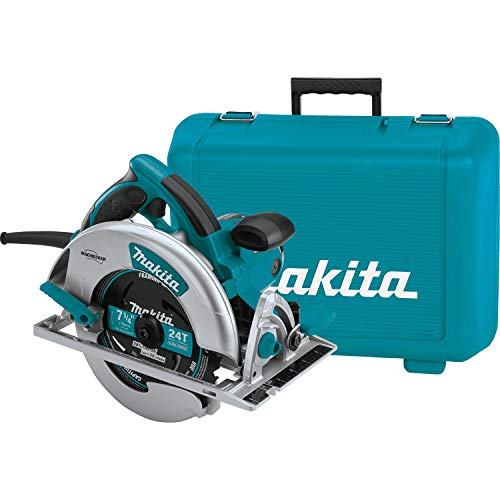
Makita 5007MGA 7-1/4" Magnesium Circular Saw
Best for: Woodworkers and contractors who want premium corded performance with magnesium durability
- Brand
- Makita
- Type
- Corded circular saw
- Power
- Corded (120V)
- Voltage
- 120V, 15 Amp
- Weight
- 10.6 lbs
$264.00Amazon price as of Oct 7, 4:36 AM EDTProduct prices and availability are accurate as of the date/time indicated and are subject to change. Any price and availability information displayed on Amazon.com at the time of purchase will apply to the purchase of this product.
What we like
- Full magnesium construction for durability and reduced weight
- Dual LED lights eliminate cut line shadows
- 56-degree bevel with three positive stops
- Electric brake and carrying case included
Watch out for
- Heavier at 10.6 lbs compared to the DeWalt DWE575SB (8.8 lbs)
- Aggressive sawdust dispersion (poor dust management)
- No laser guide
- Higher price than basic corded saws
Final Thoughts
Making a rip cut with a circular saw is a fundamental skill that opens up a wide range of projects. I think it's one of the first techniques any DIYer should learn. Whether you're ripping plywood for shelving, narrowing dimensional lumber for a custom fit, or breaking down sheet goods for a workbench build, the technique is the same: mark carefully, set up a guide, use the right blade, and let the saw do the work.
What I like most about this technique is that preparation matters more than raw skill. A well-supported workpiece, a properly positioned guide, and a sharp rip blade will produce a straight, clean cut even if your hands aren't perfectly steady. Skip any of those steps and no amount of skill will save the cut.
If you're still deciding on the right saw for your shop, check out our best circular saws roundup for picks at every price point. And if you're weighing whether a circular saw or table saw better fits your needs, that comparison breaks down exactly when each tool makes sense. For sheet goods and panel cutting, you might also want to look at table saw vs track saw options.
Now go set up that guide and make your first rip cut. Honestly, once I got comfortable with this technique, I found myself reaching for the circular saw more often than the table saw for one-off rip cuts. You probably will too.
Affiliate Disclosure
This post contains affiliate links. As an Amazon Associate, HomeBuildLab earns from qualifying purchases at no additional cost to you. Learn more
Prices shown are from Amazon at the time indicated and may change. The price and availability on Amazon.com at the time of purchase apply.
Sam Hartwell
Sam Hartwell edits HomeBuildLab's tool reviews and home improvement guides. Every pick starts with manufacturer spec sheets, warranty terms, parts availability and owner feedback, then gets matched to a specific job and budget. Guides list the trade-offs plainly and get updated when models change or go out of stock.
Keep reading: Saws
All saws guides → How-To
Saws
How to Change a Circular Saw Blade: Step-by-Step
Learn how to change a circular saw blade safely in minutes. Step-by-step instructions covering spindle locks, blade direction, and common mistakes to avoid.
Updated
 Buying Guide
Saws
How to Choose a Circular Saw: A Buyer's Guide
Learn how to choose a circular saw that fits your projects and budget. I break down blade size, power, drive type, and the features that actually matter.
Updated
 Comparison
Saws
Miter Saw vs Circular Saw: Key Differences That Actually Matter
Miter saw vs circular saw: which one should you buy first? I compare accuracy, portability, cut types, and cost so you pick the right saw for your projects.
Updated
 Comparison
Saws
Corded vs Cordless Circular Saw: When Cutting the Cord Makes Sense
Corded vs cordless circular saw: I break down power, runtime, cost, and portability so you can pick the right saw for your projects, budget, and workspace.
Updated
 Comparison
Saws
Circular Saw vs Table Saw: The Right First Saw for Beginners
Circular saw vs table saw: which one should you buy first? I compare cost, portability, precision, and safety to help beginners pick the right first saw.
Updated
 Top Picks
Saws
Best Circular Saws in 2026: Sidewinder and Worm Drive Picks Compared
I compared 7 circular saws from budget to pro-grade. Find the best circular saw for framing, woodworking, and DIY with honest picks for corded and cordless.
Updated
The HomeBuildLab newsletter
New guides and tool deals worth knowing about
One short email when we publish or update a buying guide. No spam, unsubscribe anytime.