Best Soldering Irons for Electronics: Stations, Pens, and Kits Compared
Quick Comparison
| Product | Best For | Buy |
|---|---|---|
 Hakko FX-888D (Best Overall) Hakko · Corded (120V) · 2.6 lbs | Hobbyists and professionals who want a reliable daily-driver station | |
 X-Tronic 3020-XTS (Best Value) X-Tronic · Corded (120V) · 1.5 lbs | Anyone who wants station-grade performance without the premium price | |
 Plusivo 60W Soldering Iron Kit (Best Budget) Plusivo · Corded (120V) · 0.5 lbs (iron only) | Beginners who want a complete starter kit at the lowest possible price | |
 Weller WE1010NA (Best Premium) Weller · Corded (120V) · 5.51 lbs | Professionals and serious hobbyists who demand the best temperature stability | |
 PINECIL V2 (Best Portable) Pine64 · USB-C (PD/QC 3.0) or DC barrel jack · 1.1 oz (30g, iron only) | Makers who need a portable, hackable soldering iron for field work | |
 YIHUA 862BD+ (Best for SMD Rework) YIHUA · Corded (120V) · 7.7 lbs | Electronics repair technicians who need soldering and hot air rework in one unit | |
 YIHUA 939D+ (Best for Beginners) YIHUA · Corded (120V) · 4.7 lbs | Beginners who want a real station without the premium price |
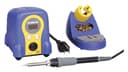
Hakko FX-888D (Best Overall)
Hobbyists and professionals who want a reliable daily-driver station
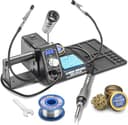
X-Tronic 3020-XTS (Best Value)
Anyone who wants station-grade performance without the premium price
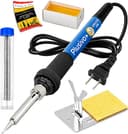
Plusivo 60W Soldering Iron Kit (Best Budget)
Beginners who want a complete starter kit at the lowest possible price
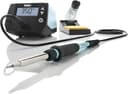
Weller WE1010NA (Best Premium)
Professionals and serious hobbyists who demand the best temperature stability
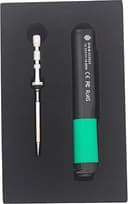
PINECIL V2 (Best Portable)
Makers who need a portable, hackable soldering iron for field work
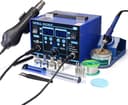
YIHUA 862BD+ (Best for SMD Rework)
Electronics repair technicians who need soldering and hot air rework in one unit
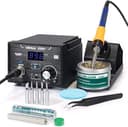
YIHUA 939D+ (Best for Beginners)
Beginners who want a real station without the premium price
If you're looking for the best soldering iron, here's the truth: you don't need to spend $300 to get reliable, precise joints. But you do need to spend more than $10 on a gas station pencil iron that will burn your pads and ruin your components. I get asked "which soldering iron should I buy?" more than almost any other tool question, and the answer always starts the same way: the sweet spot depends entirely on what you're soldering and how often.
I researched dozens of soldering irons and stations, compared specs, and dug through thousands of user reviews to find the best options at every price point. Whether you're wiring up your first Arduino project or reflowing SMD components on a custom PCB, one of these seven picks will serve you well.
Most "best soldering iron" lists treat every iron the same. They're not. A 40W analog station and a 75W digital station with PID control are completely different tools. I'll explain what actually matters before getting into the recommendations, so you can pick the right iron (not just the most expensive one).
Quick Picks: Best Soldering Irons at a Glance
- Best Overall: Hakko FX-888D. I'd pick this for most people. Digital PID control, 5 presets, and a massive tip ecosystem make it the gold standard.
- Best Value: X-Tronic 3020-XTS. In my opinion, the best bang for your buck. 75W station with digital display, brass tip cleaner, and sleep mode for under $60.
- Best Budget: Plusivo 60W Soldering Iron Kit. Everything a beginner needs for under $15, including solder, stand, and tips.
- Best Premium: Weller WE1010NA. German-engineered 70W station with exceptional temperature stability and an ESD-safe design.
- Best Portable: PINECIL V2. USB-C powered, open-source, and heats to working temp in 6 seconds.
- Best for SMD Rework: YIHUA 862BD+. A 2-in-1 soldering and hot air rework station at a fraction of the professional price.
- Best for Beginners: YIHUA 939D+. A proper digital station with PID control at a beginner-friendly price.
Soldering Iron vs. Soldering Station: Which Do You Need?
Before you pick a product, you need to understand the two main categories.
Pencil-style soldering irons are standalone tools that plug directly into the wall. They're compact, affordable, and fine for occasional repairs. The tradeoff is limited temperature control. Most use a simple dial or fixed wattage, meaning the tip temperature fluctuates as you work. That's a problem when you're soldering sensitive ICs or tiny SMD pads.
Soldering stations separate the heating element from the power supply and control electronics. The base unit houses the transformer and a PID controller that monitors tip temperature dozens of times per second, making automatic corrections. The result is a lighter, more comfortable handpiece and temperature stability within a few degrees of your target.
Here's the practical difference: a basic pencil iron might swing 40-50 degrees during heavy soldering. A good station with PID control holds within 3-5 degrees. For through-hole components and wire splicing, that swing doesn't matter much. For fine-pitch SMD work, it's the difference between clean joints and lifted pads.
My recommendation: If you're soldering more than once a month, get a station. I'd point most people toward the YIHUA 939D+ or X-Tronic 3020-XTS. Either one costs less than a nice dinner out, and the precision and comfort are worth every cent. If you only solder a few times a year, the Plusivo kit gets the job done.
My Top Picks
Hakko FX-888D (Best Overall)
Hakko FX-888D (Best Overall)
Hobbyists and professionals who want a reliable daily-driver station
Pros
- PID temperature control holds within a few degrees of the set point
- Over 30 T18 tip shapes available for any soldering task
- 5 preset temperatures for quick switching between tasks
- Compact footprint doesn't hog bench space
Cons
- Two-button interface takes time to learn
- The blue-and-yellow color scheme isn't for everyone
- No digital temperature readout on the handpiece itself
the Hakko FX-888D is the best soldering iron station for most people, and it has been for years. There's a reason you'll find it on nearly every electronics workbench from maker spaces to repair shops. It heats to 350C in about 30 seconds, recovers from thermal drops in under 3 seconds, and holds temperature rock-steady thanks to its PID-controlled ceramic heating element.
Five user-selectable temperature presets let you switch between tasks without fumbling through menus. Working on leaded solder at 350C, then switching to lead-free at 370C? Two button presses. The T18 tip ecosystem is enormous, with over 30 tip shapes available. That means you can get precision conical tips for SMD work, wide chisel tips for ground planes, and everything in between.
The interface takes some getting used to. The two-button system on the front panel works, but it's not intuitive compared to the Weller's navigational controls. The base unit is heavy enough to stay planted on your bench, and the handpiece is lightweight and comfortable for marathon soldering sessions.
X-Tronic 3020-XTS (Best Value)
X-Tronic 3020-XTS (Best Value)
Anyone who wants station-grade performance without the premium price
Pros
- PID temperature control with 3.6F stability at a budget price
- Auto-sleep timer protects your tips and saves energy
- Brass sponge tip cleaner and solder roll holder built in
- Five extra tips included in the box
Cons
- Tip ecosystem is smaller than Hakko or Weller
- 60W of actual heating power may struggle with large ground planes
- Base unit feels less robust than premium stations
What I like most about the X-Tronic 3020-XTS is how it punches well above its price class. At roughly $60 with five extra tips included, it delivers PID-controlled temperature stability within 3.6F of the set point. That's comparable to stations costing twice as much. The bright blue LED display is easy to read even in a dimly lit workshop, and the C/F toggle switch is a welcome touch for those who think in metric.
The 10-minute sleep timer automatically reduces the tip temperature when you step away, extending tip life and reducing fire risk. A brass sponge tip cleaner is built into the base (a feature some pricier stations skip), along with a solder roll holder that keeps your workbench organized.
The 75W rating is somewhat misleading. Sixty watts go to the heating element and 15 watts power the internal motherboard. Still, 60 watts of actual heating power is plenty for through-hole work and most SMD tasks. Where it falls short compared to the Hakko is tip variety. X-Tronic's tip selection is more limited, though the included assortment covers most common jobs.
Plusivo 60W Soldering Iron Kit (Best Budget)
Plusivo 60W Soldering Iron Kit (Best Budget)
Beginners who want a complete starter kit at the lowest possible price
Pros
- Complete kit with iron, tips, solder, flux, and stand
- Ceramic heating element heats up quickly
- Adjustable temperature dial for basic control
- Unbeatable price for beginners
Cons
- No PID control means temperature fluctuates during heavy use
- No ESD protection for sensitive components
- You'll outgrow it quickly if you solder regularly
If you're soldering your first PCB or just need an iron for occasional wire repairs, the Plusivo 60W kit is the right place to start. For around $13, you get the iron, a stand, a sponge, five replacement tips, solder wire, and rosin flux paste. That's everything you need to start soldering out of the box.
The ceramic heating element reaches working temperature quickly, and the adjustable dial lets you control temperature between 392F and 842F. Four ventilation holes along the barrel help with heat dissipation, and the silicone grip stays cool enough during typical sessions. It's not going to compete with a PID-controlled station for precision, but for through-hole components and basic wire work, it's perfectly adequate.
Here's my honest take: I think this iron will teach you to solder. Once you've built a few projects and know you enjoy the hobby, you'll want to upgrade to a proper station like the YIHUA 939D+ or X-Tronic 3020-XTS. But there's no reason to spend $100 before you know if soldering is something you'll stick with.
Weller WE1010NA (Best Premium)
Weller WE1010NA (Best Premium)
Professionals and serious hobbyists who demand the best temperature stability
Pros
- Industry-leading temperature stability (plus or minus 4F)
- Intuitive front-panel controls with temperature lock
- 70W iron with toolless tip change and silicone cable
- ESD-safe with UL and CE certification
Cons
- Heavier and less portable than the Hakko FX-888D
- Premium price for features most hobbyists won't fully use
- ET tip series is slightly more expensive than Hakko's T18 tips
The Weller WE1010NA is the station you buy when you want the absolute best temperature control available under $200. Its temperature stability is rated at plus or minus 4F, and in practice it holds even tighter than that. The 70W iron delivers 40% more power than Weller's older WES/WESD stations, which means faster heat-up and better recovery when soldering to large thermal loads like ground planes.
The intuitive navigation controls on the front panel put the Hakko's two-button system to shame. Adjusting temperature, locking settings, and switching between C and F is straightforward from the moment you unbox it. The temperature lock feature is especially useful in educational settings or shared workshops where you don't want someone accidentally cranking the heat to 850F.
The WEP70 handpiece uses a heat-resistant silicone cable that stays flexible even after years of use. Tip changes are toolless, and Weller's ET tip series offers excellent variety. The heavier 5.5-pound base stays planted on your bench, though the weight makes it less portable than the Hakko or X-Tronic.
PINECIL V2 (Best Portable)
PINECIL V2 (Best Portable)
Makers who need a portable, hackable soldering iron for field work
Pros
- Heats to working temperature in just 6 seconds
- USB-C powered for true portability
- Open-source firmware with active community development
- Uses widely available Hakko T12-compatible tips
Cons
- No power supply, stand, or accessories included
- Requires a USB-C PD charger (65W recommended) for full performance
- Not ideal for beginners who need a complete setup
The PINECIL V2 is unlike anything else on this list. It's a USB-C powered, open-source soldering iron built on a RISC-V processor. It weighs just 30 grams, fits in your pocket, and heats to working temperature in 6 seconds. If you need to solder on the go, at a hackerspace, or anywhere without a full workbench, nothing else comes close.
Dual power inputs give you options: USB-C with Power Delivery or QC 3.0 support, or a DC5525 barrel jack for bench power supplies. With a 65W USB-C PD charger (not included), you get more than enough power for most electronics work. The OLED display shows temperature, power draw, and voltage in real time. Because it's open-source, the firmware is community-maintained and regularly updated with new features.
The tradeoffs are real. You need to supply your own power source and tips (it uses Hakko T12-compatible tips, which are inexpensive and widely available). There's no built-in stand, no sponge, and no accessories. It's a tool for experienced makers who know what they want, not a beginner's first iron. But for the price and portability, I think the PINECIL V2 is genuinely remarkable.
YIHUA 862BD+ (Best for SMD Rework)
YIHUA 862BD+ (Best for SMD Rework)
Electronics repair technicians who need soldering and hot air rework in one unit
Pros
- Soldering iron and hot air rework gun in one station
- PID control on both iron and hot air for precise temperature management
- Comprehensive accessory kit with tips, nozzles, tweezers, and solder
- ETL-certified and ESD-safe
Cons
- Bulky and heavy at 7.7 lbs
- Hot air gun is loud at higher airflow settings
- Soldering iron tips are proprietary to YIHUA
I'd recommend the YIHUA 862BD+ to anyone who needs two essential electronics tools in one station: a 75W PID-controlled soldering iron and a 750W hot air rework gun. If you're doing phone repairs, replacing SMD components, or reflowing BGA chips, you need hot air. Buying a separate soldering station and hot air station would cost at least $200 combined. The 862BD+ does both for around $120.
PID temperature control on both the iron and the hot air gun cycles every 20 milliseconds, keeping temperatures consistent and predictable. The kit includes five soldering tips, four hot air nozzles, ESD-safe tweezers, a desoldering pump, and lead-free solder. It's a complete SMD rework toolkit right out of the box. Sleep mode activates automatically when the iron is docked, extending tip life.
The soldering iron performance alone is comparable to standalone stations in this price range. Where the 862BD+ truly earns its value is the hot air gun. If you've ever tried to desolder a QFP chip with just an iron, you know the frustration. Hot air makes those jobs clean and easy. The only real downside is the size. At nearly 8 pounds, this isn't a grab-and-go tool. It's a bench station through and through.
YIHUA 939D+ (Best for Beginners)
YIHUA 939D+ (Best for Beginners)
Beginners who want a real station without the premium price
Pros
- PID temperature control and digital display at a beginner price
- ESD-safe design protects sensitive components
- Brushed aluminum panel resists burn marks
- Compact footprint fits easily on small desks
Cons
- Tip selection is more limited than Hakko or Weller
- 75W "equivalent" rating is somewhat vague
- Long-term durability doesn't match premium brands
The YIHUA 939D+ answers a common question: "What's the cheapest soldering station that's actually good?" At around $54, it's the most affordable option on this list that includes PID temperature control, a digital display, and ESD-safe design. Those are features that matter for consistent, reliable joints.
The brushed aluminum control panel resists burn marks (a nice detail at this price), and the digital display clearly shows your set temperature in either F or C. The built-in transformer delivers stable power to the iron, and the smart temperature control system automatically detects the handle's status, engaging sleep mode when docked.
Compared to the Plusivo kit, the 939D+ is a massive step up in temperature stability and comfort. Compared to the Hakko FX-888D, it gives up some tip variety and long-term durability. For a beginner who's committed to learning electronics but doesn't want to invest $100+ on day one, the YIHUA 939D+ is the sweet spot. It's a real soldering station that won't hold you back as you develop your skills.
What to Look For in the Best Soldering Iron
Choosing the right soldering iron comes down to six factors. Here's what actually matters, and what's just marketing.
Wattage
More watts means faster heat-up and better thermal recovery, not a hotter tip. A 40W iron and a 75W iron can both reach 400C. The difference is that the 75W iron recovers faster when you touch the tip to a large copper pour. For most electronics work, 40-65W is sufficient. If you're soldering thick wires, large connectors, or automotive work, look for 70W or more.
Temperature Control
This is the most important spec. Fixed-temperature irons and dial-controlled irons are fine for basic work, but they lack precision. PID-controlled stations actively monitor and correct the tip temperature, keeping it within a few degrees of your target. If you're soldering anything with ICs or fine-pitch components, PID control is worth the upgrade.
Tip Compatibility
Your soldering iron is only as good as its tip selection. Hakko's T18 series and Weller's ET series offer dozens of shapes and sizes. Budget brands often have limited tip options. Before buying, check that replacement tips and specialty shapes are readily available and affordable.
ESD Safety
If you're working on circuit boards with sensitive ICs, MOSFETs, or microcontrollers, you want an ESD-safe iron. This means the tip is grounded through the station, preventing static discharge from damaging your components. Most stations above $50 include ESD protection. Budget pencil irons typically don't.
Ergonomics
You'll hold this tool for hours. A lightweight handpiece with a comfortable grip and a flexible cord makes a real difference during long sessions. Stations with separate base units have lighter, thinner handpieces because the heavy transformer lives in the base. That's a major advantage over all-in-one pencil irons.
Accessories and Ecosystem
Consider what comes in the box and what you'll need to buy separately. Some stations include multiple tips, brass cleaners, and solder holders. Others ship with just the iron and a single tip. Also consider long-term costs: are replacement tips $3 each or $15?
If you already own a best heat gun for stripping paint and shrink-wrapping, a soldering station rounds out your electronics toolkit nicely. And for detail work like deburring solder joints or cleaning PCB edges, a rotary tool is a useful companion.
Common Soldering Iron Questions
How many watts do I need for electronics soldering?
For circuit board work with through-hole and SMD components, 40-65 watts is the sweet spot. This provides enough thermal mass to make clean joints without overheating delicate components. For thicker wires, connectors, and automotive work, 70W or more gives you better recovery time.
Can I use a cheap soldering iron for Arduino and Raspberry Pi projects?
Yes, but with caveats. A basic pencil iron will physically work for soldering header pins and wires to Arduino boards. However, the lack of temperature control means you're more likely to overheat pads or create cold joints. If you're going to solder regularly, a budget station like the YIHUA 939D+ ($54) is a much better investment than replacing damaged boards.
What temperature should I set my soldering iron to?
For leaded solder (60/40 or 63/37), start at 315-345C (600-650F). For lead-free solder, increase to 345-375C (650-710F). These are starting points. The ideal temperature depends on tip size, solder type, and the thermal mass of the joint. If your solder isn't flowing within 2-3 seconds, increase the temperature by 10C.
Do I need a soldering station, or is a pencil iron enough?
That depends on how often you solder and what you're soldering. For occasional wire splicing and basic repairs, a pencil iron like the Plusivo is fine. For regular electronics work, especially anything involving ICs or SMD components, a station's temperature stability and ESD protection are worth the upgrade. The price gap has shrunk significantly: a good station costs $50-60, barely more than some pencil iron kits.
What's the difference between a chisel tip and a conical tip?
A chisel tip has a flat, screwdriver-like end that provides more surface contact with the pad and component lead. It's the most versatile tip shape and what most experienced solderers use for general work. A conical (pointed) tip is better for fine-pitch SMD components where you need precise placement. Start with a chisel tip and add a conical tip when you need one.
How do I maintain my soldering iron tips?
Tin your tip frequently by applying a thin coat of solder before and after each session. Never let the tip sit at high temperature without solder on it, as this causes oxidation and reduces heat transfer. Clean the tip using a brass sponge (preferred) or a damp cellulose sponge. When not in use, lower the temperature or use your station's sleep mode. A well-maintained tip can last months. A neglected one might last days.
Final Thoughts
The best soldering iron for you depends on your experience level, your budget, and what you're building. If I had to recommend just one station to a friend, it would be the Hakko FX-888D. It delivers professional-grade temperature control, a huge tip ecosystem, and proven reliability at a price that won't break the bank. It's the station that grows with your skills.
If you're just starting out, the YIHUA 939D+ offers real station performance at a beginner-friendly price. And if portability matters, the PINECIL V2 is in a class of its own. For anyone needing both soldering and hot air rework, the YIHUA 862BD+ combines two essential tools at a price that's hard to argue with.
Don't overthink finding the best soldering iron. Pick the station that matches your current needs, invest in a few quality tip shapes, and practice your technique. If you're brand new, our how to solder guide walks you through the basics. The right soldering iron makes the hobby more enjoyable, but your skills matter more than your equipment. If you're also building a home electronics bench, pair your soldering station with a cordless drill for project enclosures and a rotary tool for precision finishing work.
Affiliate Disclosure
This post contains affiliate links. As an Amazon Associate, HomeBuildLab earns from qualifying purchases at no additional cost to you. Learn more
Looking for the right tools and products?
Check out our product reviews and buying guides to find the best gear for your project.
Browse Reviews