How to Use a Miter Saw: A Beginner's Guide
Learn how to use a miter saw with our step-by-step beginner guide covering crosscuts, miter cuts, bevel cuts, safety rules, and tips for accurate results.
Reader-supported: we may earn a commission when you buy through links on this page, at no extra cost to you. How we research
We don't run a test lab. For each guide we compare manufacturer specs, warranty terms and owner reviews, then match models to specific jobs and budgets. We say when a pick is a trade-off, and every product has cons listed.
As an Amazon Associate, HomeBuildLab earns from qualifying purchases. Read our full affiliate disclosure.

I think a miter saw is one of the best first power tools you can own. It makes fast, accurate crosscuts and angled cuts with minimal setup, and it's safer and more approachable than most other stationary saws. If you've never used one before, this guide will teach you how to use a miter saw from your very first cut through more advanced techniques like bevel and compound angles.
Here's the truth most guides won't tell you: the miter saw is a simple tool that beginners overcomplicate. The blade goes down, it cuts the board, the blade comes back up. Everything else (miter angles, bevels, compound cuts) is just a variation on that same motion. Once you understand the basics and develop good safety habits, you'll be making clean, precise cuts within an afternoon.
This article covers the parts of your saw, essential safety rules, step-by-step instructions for every type of cut, and the mistakes that trip up most beginners. If you don't have a saw yet, check our best miter saws roundup or our guide on what size miter saw you actually need.
Know Your Miter Saw: Parts and Controls
Before you make a single cut, spend five minutes getting familiar with the main parts of your saw. Every miter saw, regardless of brand or size, shares these core components.
Blade and blade guard. The circular blade does the cutting. The blade guard is a spring-loaded cover that retracts automatically as you lower the blade and snaps back when you raise it. Never remove or disable the blade guard.
Fence. The tall, flat surface behind the blade. Your workpiece presses firmly against the miter saw fence during every cut. If the fence isn't square to the blade, nothing you cut will be accurate.
Table (base). The flat surface the workpiece sits on. The table rotates left and right to set your miter angle.
Miter lock and miter scale. The miter lock handle releases the table so it can swing to different angles. The scale shows your current miter angle in degrees. Most saws have detent stops at common angles like 0, 15, 22.5, 31.6, and 45 degrees that click into place automatically.
Bevel lock and bevel scale. On compound miter saws, the saw head tilts left (or both directions on dual-bevel models). The bevel lock releases the head for tilting, and the bevel scale shows the angle. This is separate from the miter angle.
Trigger and safety switch. The trigger is in the handle. Many saws also have a separate safety key or lock that must be engaged before the trigger works.
Dust port. A circular port at the back of the blade guard that connects to a shop vacuum or dust bag. Miter saws throw a lot of sawdust, so connecting dust collection is worth doing from day one.
Essential Safety Rules
A miter saw is safer than most power saws because the blade is enclosed and the cutting motion is controlled. But it can still cause serious injuries if you get careless. In my opinion, safety is the one area where you should never cut corners (no pun intended). Follow these rules every single time.
Wear safety glasses and hearing protection. Sawdust and wood chips fly toward your face on every cut. A dust mask is smart if you're cutting treated lumber or MDF.
Keep your hands at least six inches from the blade path. This is the most important rule. If the workpiece is too short to hold safely (under 8 inches), use a clamp instead of your hand.
Let the blade reach full speed before cutting. Pull the trigger, wait a full second for the motor to spin up, then lower the blade. Starting the cut before full speed causes the blade to grab the workpiece.
Wait for the blade to stop before raising it. Release the trigger but keep the blade down until it stops spinning completely. Lifting a spinning blade can fling the offcut piece.
Secure the workpiece against the fence. The board must be flat on the table and pressed firmly against the fence. If it shifts during the cut, the blade can bind or throw the piece.
Never reach across the blade path. Wait for the blade to stop, raise the head, then reach for the offcut.
No loose clothing, jewelry, or dangling drawstrings. Anything that can catch a spinning blade will catch a spinning blade.
How to Make a Basic Crosscut
A crosscut is a straight, 90-degree cut across the width of a board. This is the cut you'll make most often, and it's the single best place to start when learning how to use a miter saw (sometimes called a chop saw). Here's the step-by-step process.
Step 1: Measure and mark. Measure your desired length and make a clear pencil line on the face of the board. A V-shaped mark (with the point at the exact measurement) is more precise than a single line.
Step 2: Verify your saw is set to zero. Check that both the miter angle and bevel angle read 0 degrees. If your saw was adjusted for a previous cut, reset both to zero and engage the detent locks.
Step 3: Position the board. Place the board flat on the saw table with the back edge pressed against the fence. Slide it until your pencil mark aligns with the blade. Critical detail: the blade has width (called kerf, usually about 1/8 inch). Always position the blade so the teeth are on the waste side of your line. If you cut right on the line, your piece will be 1/16 inch too short.
Step 4: Dry run. With the saw off, lower the blade slowly to check alignment. The teeth should just kiss the waste side of your pencil mark.
Step 5: Secure and cut. Hold the board against the fence with your left hand, well away from the blade path. Pull the trigger with your right hand, let the blade reach full speed, then lower it smoothly through the board. Let the blade do the work.
Step 6: Release and wait. Release the trigger. Hold the blade down until it stops, then raise it and remove your workpiece.
If the cut edge shows rough fibers or tear-out, your blade is likely dull or you're lowering too fast. A sharp 60-tooth crosscutting blade produces clean results on most materials.
How to Make Miter Cuts
A miter cut is an angled cut across the face of the board. You swing the saw table left or right to cut at an angle instead of straight across. Miter cuts are essential for picture frames, baseboards, door casings, and any project where two pieces meet at a corner. For a full overview of what a miter saw is used for, see our dedicated guide.
Setting the angle. Release the miter lock handle and swing the table to your desired angle. For a standard 90-degree corner, each piece gets a 45-degree miter cut. The two 45-degree angles combine to form the corner joint. Most saws have a positive detent at 45 degrees that clicks into place. Lock the handle once you're set.
Which direction to swing. This is where beginners get confused. The direction depends on which side of the joint you're cutting. I'd suggest this approach to avoid mistakes: hold the actual piece against the fence in the position it will be installed, mark the cut angle directly on the board, and set the miter direction to match.
Making the cut. The technique is identical to a crosscut. Position the board, align the blade to the waste side, let the blade reach full speed, and lower smoothly. The only difference is that the blade enters one edge of the board before the other. Let it work through at its own pace.
Test the joint. Hold both pieces together to check the fit. A perfect miter joint closes tightly with no visible gap at the outside corner. If there's a gap, adjust by half a degree and recut.
For a deeper look at how the miter saw stacks up against other saws, see our table saw vs miter saw comparison.
How to Make Bevel Cuts
A bevel cut tilts the blade so the cut is angled through the thickness of the board, not across the face. A crosscut leaves a square edge; a bevel cut leaves an angled edge. What I find most important is understanding when you actually need a bevel cut: edge treatments, joinery, and fitting pieces against walls that aren't perfectly plumb. If you have a compound miter saw or a sliding compound miter saw, the bevel capability is already built in.
Setting the bevel angle. Release the bevel lock (usually a lever or knob at the back of the saw head) and tilt the blade to the desired angle. Most saws tilt left up to 45 or 48 degrees. Dual-bevel saws tilt in both directions, saving you from having to flip the workpiece.
Key difference from miter cuts. The saw table stays at 0 degrees. Only the blade head tilts. The board sits flat on the table against the fence, but the blade enters at an angle through the thickness.
Common uses. Fitting baseboards against walls that aren't perfectly vertical, creating chamfered edges on shelves and tabletops, and back-beveling miter joints so the visible front edge closes tightly even on out-of-square corners.
Compound Cuts Explained
A compound cut combines a miter angle and a bevel angle in the same cut. The table swings left or right while the blade head also tilts. This produces a cut angled in two planes simultaneously.
The most common application is crown molding. Crown molding sits at an angle between the wall and ceiling, so cutting it flat on the saw table requires both a miter and a bevel to produce the correct joint. For standard crown molding with a 38-degree spring angle, you'll set the miter to 31.6 degrees and the bevel to 33.9 degrees for inside corners. These numbers are published in crown molding cutting charts. Keep one bookmarked on your phone. If you plan to tackle crown molding, our guide on how to cut crown molding with a miter saw walks through the full technique.
Setup tip: I'd suggest setting the miter angle first and locking it, then setting the bevel angle and locking that. Make sure both locks are tight before cutting. Compound cuts have the highest error rate because you're managing two angles, so always test on scrap material first. Even experienced carpenters test compound cuts before committing to their actual workpiece.
How to Use a Miter Saw More Accurately: Tips That Matter
From what I have seen about what separates clean cuts from sloppy ones, these tips make the biggest difference. Whether you own a standard, compound, or sliding miter saw, every one of these applies.
Square your saw before starting. Place a combination square against the fence and lower the blade to check that it's perfectly perpendicular. Do the same with the square flat on the table against the blade body (not the teeth) to verify the bevel is at true zero. For a detailed walkthrough, see our guide on how to square a miter saw.
Upgrade your blade. This is something I tell every new miter saw owner. The blade that ships with most saws is adequate but not great. A quality 60-tooth or 80-tooth crosscutting blade (like a Diablo or Freud) noticeably improves cut quality and reduces tear-out.
Cut on the waste side of the line. This bears repeating. The blade has width. Always position it so the teeth remove material from the waste side, not the keeper side.
Use a stop block for repeated cuts. If you need multiple pieces at the same length, clamp a block of wood to the fence at the correct distance from the blade. Slide each board against the block, cut, repeat. This is faster than measuring every piece and far more consistent.
Support long boards. A miter saw table is only about 8 inches deep on each side of the blade. Long boards will droop off the edges, causing inaccurate cuts. Use a roller stand, sawhorse, or dedicated miter saw stand to support the board at table height.
Make a zero-clearance insert. The gap around the blade in the throat plate allows thin offcuts to get pulled down, which can jam the blade or damage the workpiece. Attach a piece of 1/4-inch hardboard to the fence and table, then lower the spinning blade through it. This dramatically reduces tear-out on the bottom face.
Common Beginner Mistakes
I've researched dozens of woodworking forums and user reviews, and the same mistakes come up over and over again. Here are the ones to watch for.
Cutting on the wrong side of the line. You measured 24 inches, marked the board, and cut right on the line. Now the piece is 23-7/8 inches because the blade kerf removed 1/8 inch from your keeper side. Always cut on the waste side.
Not checking that the saw is square. Factory settings drift over time, especially after transport. A blade even one degree off from square produces noticeable gaps in joints. It takes 30 seconds with a combination square. Check periodically.
Holding the board with the wrong hand. Your support hand should be on the same side as the keeper piece, well away from the blade path. Reaching across the blade is a dangerous habit.
Lifting the blade before it stops. The blade spins at several thousand RPM when you release the trigger. Raising it immediately can fling the offcut. Wait the extra two seconds.
Cutting short pieces freehand. Pieces under 8 inches are hard to hold safely. Use a clamp, or cut the piece from a longer board so you have something to grip. Make the cut, then trim the excess separately.
Ignoring dust collection. Miter saws produce enormous amounts of fine sawdust. In my opinion, this is one of the most underrated aspects of learning how to use a miter saw properly. Connect a shop vacuum to the dust port before your first cut. Your lungs will thank you.
Compare our picks
2 picks- Best OverallDeWalt DWS780 12" Double-Bevel Sliding Compound Miter Saw
DeWalt · Corded · 56 lbs
Trim carpenters and serious woodworkers who want the most popular pro miter saw on the market
$649.00Amazon price as of Oct 7, 6:13 PM EDTProduct prices and availability are accurate as of the date/time indicated and are subject to change. Any price and availability information displayed on Amazon.com at the time of purchase will apply to the purchase of this product.
View on Amazon - Best BudgetMetabo HPT C10FCG2 10" Compound Miter Saw
Metabo HPT (formerly Hitachi) · Corded · 24 lbs
DIYers and beginners who need a functional miter saw without a large investment
$111.95Amazon price as of Oct 7, 6:13 PM EDTProduct prices and availability are accurate as of the date/time indicated and are subject to change. Any price and availability information displayed on Amazon.com at the time of purchase will apply to the purchase of this product.
View on Amazon
Recommended Tools
Ready to buy? These are the top picks from our best miter saw guide.

DeWalt DWS780 12" Double-Bevel Sliding Compound Miter Saw
Best for: Trim carpenters and serious woodworkers who want the most popular pro miter saw on the market
- Brand
- DeWalt
- Type
- 12" dual-bevel sliding compound miter saw
- Power
- Corded
- Voltage
- 120V, 15 Amp
- Weight
- 56 lbs
$649.00Amazon price as of Oct 7, 6:13 PM EDTProduct prices and availability are accurate as of the date/time indicated and are subject to change. Any price and availability information displayed on Amazon.com at the time of purchase will apply to the purchase of this product.
What we like
- XPS LED shadow cutline system is always accurate with zero calibration
- 75%+ dust collection is among the best for any miter saw
- Massive crosscut capacity (2x14 at 90 degrees)
- Proven design with extensive accessory ecosystem
Watch out for
- Rails extend behind the saw, requiring wall clearance
- 56 lbs is manageable but not lightweight
- Premium price, toward the top of the corded DeWalt lineup
- 12" blades cost more than 10" blades
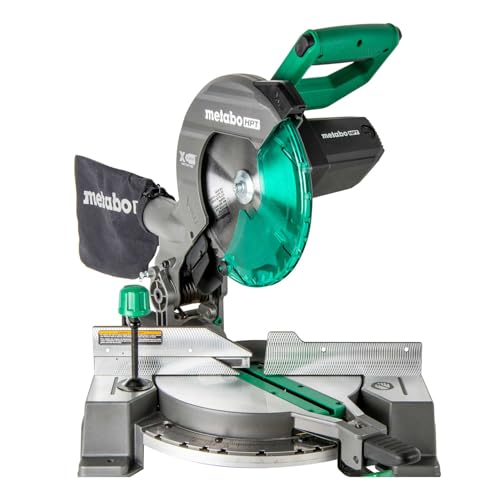
Metabo HPT C10FCG2 10" Compound Miter Saw
Best for: DIYers and beginners who need a functional miter saw without a large investment
- Brand
- Metabo HPT (formerly Hitachi)
- Type
- 10" single-bevel compound miter saw
- Power
- Corded
- Voltage
- 120V, 15 Amp
- Weight
- 24 lbs
- Warranty
- 5-year limited
$111.95Amazon price as of Oct 7, 6:13 PM EDTProduct prices and availability are accurate as of the date/time indicated and are subject to change. Any price and availability information displayed on Amazon.com at the time of purchase will apply to the purchase of this product.
What we like
- Incredibly lightweight at 24 lbs for easy carrying
- 15-amp motor at 5,000 RPM is the fastest budget option
- 5-year warranty beats most premium brands
- 40-tooth carbide blade included, cleaner than typical budget blades
Watch out for
- Single bevel only (left side), requiring workpiece flipping
- Non-sliding design limits crosscut to 2x6 lumber
- Basic dust bag, so a shop vac helps
Final Thoughts
Learning how to use a miter saw is genuinely one of the most rewarding skills you can pick up as a beginner. If I had to recommend one tool for someone just getting started with DIY projects, this would be it. The saw does the hard part. Your job is to measure accurately, set the correct angle, keep your hands in the right place, and let the blade work at its own pace. Follow the safety rules, practice on scrap wood, and you'll be making clean crosscuts and miter cuts within your first session.
Start with basic crosscuts and work your way up to miter cuts, then bevels, and finally compound cuts as your projects demand them. Most home projects only require straight crosscuts and the occasional 45-degree miter, and those are the two easiest cuts to learn.
If you're still choosing a saw, our best miter saws roundup covers the top options at every price point, and our what size miter saw guide helps you pick the right blade size for your projects. For a deeper comparison of workshop saws, check out table saw vs miter saw. The miter saw may not be the most versatile tool in your shop, but for the cuts it handles, nothing else comes close.
Affiliate Disclosure
This post contains affiliate links. As an Amazon Associate, HomeBuildLab earns from qualifying purchases at no additional cost to you. Learn more
Prices shown are from Amazon at the time indicated and may change. The price and availability on Amazon.com at the time of purchase apply.
Sam Hartwell
Sam Hartwell edits HomeBuildLab's tool reviews and home improvement guides. Every pick starts with manufacturer spec sheets, warranty terms, parts availability and owner feedback, then gets matched to a specific job and budget. Guides list the trade-offs plainly and get updated when models change or go out of stock.
Keep reading: Saws
All saws guides → How-To
Saws
How to Cut Crown Molding with a Miter Saw: A Step-by-Step Guide
Learn how to cut crown molding with a miter saw using the nested method. Step-by-step guide to inside corners, outside corners, coped joints, and pro tips.
Updated
 How-To
Saws
How to Square a Miter Saw for Accurate Cuts
Learn how to square a miter saw in three simple steps: adjust the fence, bevel, and miter detents for dead-accurate crosscuts and tight joints every time.
Updated
 How-To
Saws
What is a Miter Saw Used For? 10 Common Uses Explained
Wondering what is a miter saw used for? I cover 10 common uses, from trim and framing to furniture and decking, plus what this saw can and can't do well.
Updated
 Comparison
Saws
Sliding vs Non-Sliding Miter Saw: Which Do You Need?
Sliding vs non-sliding miter saw: I compare crosscut capacity, accuracy, price, weight, and footprint so you can pick the right saw for your shop in 2026.
Updated
 Buying Guide
Saws
What Size Miter Saw Do I Need? A Practical Guide
Not sure what size miter saw you need? I break down 7-1/4", 10", and 12" options, sliding vs. non-sliding, and help you pick the right saw for your projects.
Updated
 Comparison
Saws
Table Saw vs Miter Saw: Which Do You Actually Need First?
Table saw vs miter saw: I compare cut types, versatility, safety, portability, and price so you can pick the right first saw for your home workshop in 2026.
Updated
The HomeBuildLab newsletter
New guides and tool deals worth knowing about
One short email when we publish or update a buying guide. No spam, unsubscribe anytime.