How to Square a Miter Saw for Accurate Cuts
Learn how to square a miter saw in three simple steps: adjust the fence, bevel, and miter detents for dead-accurate crosscuts and tight joints every time.
Reader-supported: we may earn a commission when you buy through links on this page, at no extra cost to you. How we research
We don't run a test lab. For each guide we compare manufacturer specs, warranty terms and owner reviews, then match models to specific jobs and budgets. We say when a pick is a trade-off, and every product has cons listed.
As an Amazon Associate, HomeBuildLab earns from qualifying purchases. Read our full affiliate disclosure.

I think learning how to square a miter saw is one of the most underrated skills you can pick up as a woodworker or DIYer. A saw that's even half a degree off at the blade will produce cuts that are visibly wrong at the joint, and those small errors compound fast. Two slightly off cuts on a picture frame, for example, will leave a gap you can see from across the room.
Here's the truth: even brand-new miter saws can arrive slightly out of alignment from the factory. I'd estimate that the majority of new saws need at least a minor adjustment out of the box. And every saw drifts over time through normal use, vibration, transport, and the occasional bump. The built-in angle indicators and detent stops are only as reliable as your last calibration.
The good news is that miter saw alignment is straightforward. With a quality square and about 15 minutes, you can bring your saw back to dead-accurate. This guide walks you through the full process, step by step, so you can trust your cuts again.
Signs Your Miter Saw Is Out of Square
Before you start adjusting anything, it helps to know what "out of square" actually looks like. Here are the most common signs:
- Gaps at joints. You set the saw to 90 degrees, make two crosscuts, and the pieces don't meet flush. A triangle of light appears when you hold the cut ends together.
- Miter joints that won't close. Picture frames, trim corners, and box joints with visible gaps, even though the saw reads 45 degrees exactly.
- Slight angles on crosscuts. You cut a board straight across, hold a square against the end, and see daylight between the square and the wood.
- Inconsistent measurements. The left side of your cut piece measures slightly different from the right side.
If any of these sound familiar, your saw needs to be squared. The problem is almost never the blade itself. It's usually the fence alignment, the bevel stop, or the miter detent plate.
Tools You'll Need to Square a Miter Saw
You don't need much for this job, but the quality of your square matters. A cheap, inaccurate square will just transfer its errors to your saw.
- Combination square or speed square. A machined combination square is ideal because you can reference it against both the fence and the blade body. A speed square works for checking the blade-to-table relationship. Use the best square you own.
- Hex wrenches or screwdriver. Most miter saw adjustment bolts require a hex key (Allen wrench). Check your saw's manual for the specific sizes.
- Scrap wood. A few pieces of straight, flat lumber for test cuts. Hardwood or quality plywood works best because the cuts are cleaner and easier to evaluate.
- Feeler gauges (optional). Thin metal feeler gauges let you detect tiny gaps between the square and the blade that your eyes might miss.
One important note (and this tripped me up early on): when you reference a square against the blade, always place it against the blade body, not the teeth. The teeth are set (angled outward) and will give you a false reading.
Step 1: Square the Blade to the Fence (90-Degree Crosscut)
In my opinion, this is the single most critical adjustment on the entire saw. If the blade isn't perpendicular to the fence, every single crosscut will be off.
Check the alignment:
- Unplug the saw or remove the battery. Safety first.
- Lower the blade all the way down and lock it in the down position using the pin or lock lever.
- Set the miter angle to 0 degrees and engage the detent.
- Place your combination square flat against the fence with the ruler extending toward the blade.
- Slide the square until it touches the blade body (not the teeth). Look for any gap between the square and the blade.
If you see a gap on either side, the blade and fence are not at 90 degrees. You need to adjust.
Make the adjustment:
- Locate the fence bolts. Most miter saws have two to four bolts holding each fence half to the table. Your saw's manual will show their exact locations.
- Loosen the bolts just enough that the fence can shift. Don't remove them entirely.
- With the square still in place, nudge the fence until the gap disappears. Small taps with a rubber mallet or a block of wood help you make fine adjustments without overshooting.
- Tighten the bolts carefully, alternating sides, while keeping the square pressed against both the fence and the blade. Check the alignment again after tightening, because the act of tightening can shift the fence slightly.
On some saws, only one side of the fence is adjustable. In that case, you'll adjust just that side. Other saws have a single-piece fence with a different adjustment mechanism. Consult your saw's manual if you can't locate the adjustment points.
If you want to learn more about choosing the right saw for your workshop, check out our roundup of the best miter saws for every budget.
Step 2: Square the Blade to the Table (Bevel at 0)
This adjustment ensures the blade is perfectly vertical (90 degrees to the table surface) when the bevel is set to 0. If this is off, your cuts will be angled across the thickness of the board.
Check the alignment:
- Set the bevel to 0 degrees and engage the bevel detent or stop.
- Lower the blade and lock it in the down position.
- Place your square on the saw table with the ruler extending upward along the blade body.
- Look for any gap between the square and the blade. Check near the top and bottom of the blade.
If the blade leans even slightly to one side, the bevel stop needs adjustment.
Make the adjustment:
- Find the bevel stop bolt (sometimes called the 0-degree stop). This is typically a hex-head bolt located behind or underneath the saw's pivot point. Your manual will identify its location.
- Loosen the bevel lock handle so the blade can tilt freely.
- With the square on the table and touching the blade, tilt the blade until the gap disappears completely. The blade should sit flush against the square from top to bottom.
- While holding the blade in this position, adjust the bevel stop bolt so that it contacts its stop point at exactly this angle.
- Tighten the bevel lock, then recheck with the square.
Some saws also have a 45-degree bevel stop. You can calibrate this the same way by setting your combination square to 45 degrees and repeating the process. I'd suggest focusing on the 0-degree stop first, though, because the vast majority of cuts are straight crosscuts. You can always come back and fine-tune the 45-degree stop later if your bevel cuts need it.
Step 3: Verify the Miter Detents
Miter saws use a detent plate (a metal plate with notches) to lock the turntable at common angles like 0, 15, 22.5, 31.6, and 45 degrees. The 0-degree detent is the most important because it's your baseline for square crosscuts.
If you've squared the blade to the fence and the table but your crosscuts are still slightly off, the detent plate may be the problem. Here's how to check and adjust it.
Check the 0-degree detent:
- Set the miter angle to 0 degrees and let the turntable click into the detent.
- Make a test cut on a piece of scrap (see the next section for the full test cut method).
- If the test cut isn't perfectly square, the detent position is slightly off.
Adjust the detent plate:
- Locate the detent plate screws. These are typically accessible from underneath or through the sides of the miter angle scale.
- Loosen the screws slightly (usually two to four screws hold the plate in place).
- With the blade squared to the fence using your combination square, shift the detent plate until the 0-degree notch aligns with the turntable's locking pin in that exact position.
- Tighten the screws and verify with another test cut.
Not all miter saws have user-adjustable detent plates. Some lower-priced models have fixed detent plates. If yours isn't adjustable, you can work around it by ignoring the detent entirely: set your miter angle by referencing a square against the blade and fence, then lock the turntable with the miter lock handle. It's one extra step, but it guarantees accuracy regardless of the detent plate.
Understanding what size miter saw you need and how it handles miter adjustments can also help you choose a saw that's easier to calibrate.
The Test Cut Method
A square is a great diagnostic tool, but the ultimate test of your miter saw calibration is an actual cut. What I find most important is verifying your adjustments with real wood, not just visual checks against a square. Here's a simple test that reveals errors too small to see with a square alone.
The flip test (for 90-degree crosscuts):
- Take a straight piece of scrap lumber, at least 6 inches wide and about 18 inches long.
- Set the miter and bevel to 0 degrees.
- Trim one end of the board with a clean crosscut.
- Without moving the board, cut off a piece about 3 to 4 inches wide.
- Take that cutoff piece and flip it away from you (rotate it 180 degrees around its vertical axis) so the left edge becomes the right edge.
- Push the two cut faces together against the fence.
If the cut was perfectly square, the two pieces will meet with zero gap across the entire joint. If the cut was off, you'll see a V-shaped gap that opens toward either the top or the fence side. This gap is doubled by the flip, making even tiny errors visible.
The miter test (for 45-degree cuts):
- Cut two pieces of scrap at 45 degrees.
- Hold them together to form a 90-degree corner.
- Place a square against the outside corner. If the miter angle is accurate, the square will sit flush on both legs of the joint.
If you see a gap, adjust the miter detent or angle slightly and cut again. This process may take two or three iterations to dial in, but the result is miter joints that close perfectly. This attention to detail matters most for projects like crown molding, where even small gaps are clearly visible.
How Often Should You Square a Miter Saw?
There's no single answer here because it depends on how you use the saw. A saw that sits on a dedicated stand in your workshop and never moves may stay square for months. A saw that rides in the back of a truck to job sites every day will need more frequent attention.
Here's a practical schedule:
- After purchase. Always square a new saw before your first real project. I've yet to see a factory-calibrated saw that was truly perfect out of the box.
- After transport. Any time you move the saw to a new location, run a quick flip test before cutting project materials.
- After a blade change. Swapping blades usually doesn't throw off alignment, but it takes 30 seconds to verify, so there's no reason to skip it.
- When cuts start feeling off. If joints aren't closing the way they used to, or you're fighting to get pieces to fit, your saw has probably drifted.
- At a minimum, every few months. Even if everything seems fine, a periodic check catches slow drift before it becomes a problem.
The flip test from the section above takes about 60 seconds. Make it part of your routine before any precision project, and you'll never waste materials on cuts that are slightly off.
Whether you're working with a sliding or non-sliding miter saw, the calibration process is essentially the same. Sliding models just have an additional consideration: the slide rails should be parallel to the table surface, which you can check by comparing the depth of cut at the front and back of a wide board.
Common Causes of Out-of-Square Cuts
Even after squaring your saw, certain issues can cause inaccurate cuts. Being aware of these helps you troubleshoot when something goes wrong.
- Workpiece movement. If the board shifts during the cut, no amount of calibration will save you. Always hold the workpiece firmly against the fence, or use a clamp. This is especially important for miter cuts, where the blade's rotation wants to pull the wood sideways.
- A dull or damaged blade. A dull blade deflects under load, bending away from the cut line. this is one of the most overlooked causes of inaccurate cuts. Replace or sharpen your blade if you notice burn marks, rough cuts, or the need to force the saw through the material.
- A warped or bowed fence. Over time, some fences develop a slight bow. Place a straightedge along the fence to check. If the fence is bowed, you may need to replace it or shim behind it.
- Dust buildup. Sawdust packed into the miter detents, turntable track, or bevel pivot can prevent the saw from seating properly at its intended angle. Clean these areas regularly.
- Thin-kerf blade flex. Thin-kerf blades are more prone to deflection than standard-kerf blades, especially on deeper cuts. If you're getting inconsistent results with a thin-kerf blade, try a standard-kerf blade to see if the problem resolves.
For a deeper dive into miter saw techniques and getting the most from your tool, read our guide on how to use a miter saw with step-by-step cutting instructions.
Compare our picks
2 picks- Best OverallDeWalt DWS780 12" Double-Bevel Sliding Compound Miter Saw
DeWalt · Corded · 56 lbs
Trim carpenters and serious woodworkers who want the most popular pro miter saw on the market
$649.00Amazon price as of Oct 8, 12:10 AM EDTProduct prices and availability are accurate as of the date/time indicated and are subject to change. Any price and availability information displayed on Amazon.com at the time of purchase will apply to the purchase of this product.
View on Amazon - Best BudgetMetabo HPT C10FCG2 10" Compound Miter Saw
Metabo HPT (formerly Hitachi) · Corded · 24 lbs
DIYers and beginners who need a functional miter saw without a large investment
$111.95Amazon price as of Oct 8, 12:10 AM EDTProduct prices and availability are accurate as of the date/time indicated and are subject to change. Any price and availability information displayed on Amazon.com at the time of purchase will apply to the purchase of this product.
View on Amazon
Recommended Tools
Ready to buy? These are the top picks from our best miter saw guide.

DeWalt DWS780 12" Double-Bevel Sliding Compound Miter Saw
Best for: Trim carpenters and serious woodworkers who want the most popular pro miter saw on the market
- Brand
- DeWalt
- Type
- 12" dual-bevel sliding compound miter saw
- Power
- Corded
- Voltage
- 120V, 15 Amp
- Weight
- 56 lbs
$649.00Amazon price as of Oct 8, 12:10 AM EDTProduct prices and availability are accurate as of the date/time indicated and are subject to change. Any price and availability information displayed on Amazon.com at the time of purchase will apply to the purchase of this product.
What we like
- XPS LED shadow cutline system is always accurate with zero calibration
- 75%+ dust collection is among the best for any miter saw
- Massive crosscut capacity (2x14 at 90 degrees)
- Proven design with extensive accessory ecosystem
Watch out for
- Rails extend behind the saw, requiring wall clearance
- 56 lbs is manageable but not lightweight
- Premium price, toward the top of the corded DeWalt lineup
- 12" blades cost more than 10" blades
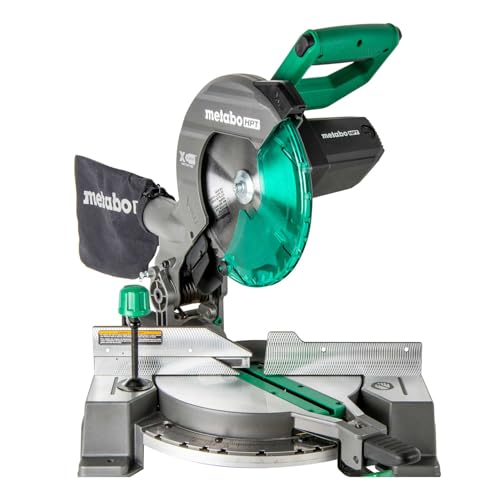
Metabo HPT C10FCG2 10" Compound Miter Saw
Best for: DIYers and beginners who need a functional miter saw without a large investment
- Brand
- Metabo HPT (formerly Hitachi)
- Type
- 10" single-bevel compound miter saw
- Power
- Corded
- Voltage
- 120V, 15 Amp
- Weight
- 24 lbs
- Warranty
- 5-year limited
$111.95Amazon price as of Oct 8, 12:10 AM EDTProduct prices and availability are accurate as of the date/time indicated and are subject to change. Any price and availability information displayed on Amazon.com at the time of purchase will apply to the purchase of this product.
What we like
- Incredibly lightweight at 24 lbs for easy carrying
- 15-amp motor at 5,000 RPM is the fastest budget option
- 5-year warranty beats most premium brands
- 40-tooth carbide blade included, cleaner than typical budget blades
Watch out for
- Single bevel only (left side), requiring workpiece flipping
- Non-sliding design limits crosscut to 2x6 lumber
- Basic dust bag, so a shop vac helps
Final Thoughts
Learning how to square a miter saw takes about 15 minutes the first time, and less than 5 minutes once you've done it a few times. The payoff is enormous: tight joints, consistent measurements, and the confidence that your cuts are accurate before you commit to expensive materials.
The process comes down to three adjustments. Square the blade to the fence. Square the blade to the table. Verify the miter detents. Then confirm everything with a test cut. I think this is one of those skills that, once you build the habit, completely changes how much you trust your saw. If you make this routine, especially after moving the saw or starting a precision project, you'll eliminate one of the most common sources of frustration in woodworking.
A perfectly squared miter saw doesn't just make better cuts. It makes your entire workflow faster, because you stop second-guessing every measurement and joint. Personally, I run the flip test before every precision project now, and it's saved me from wasting materials more times than I can count. That's worth the 15 minutes.
Affiliate Disclosure
This post contains affiliate links. As an Amazon Associate, HomeBuildLab earns from qualifying purchases at no additional cost to you. Learn more
Prices shown are from Amazon at the time indicated and may change. The price and availability on Amazon.com at the time of purchase apply.
Sam Hartwell
Sam Hartwell edits HomeBuildLab's tool reviews and home improvement guides. Every pick starts with manufacturer spec sheets, warranty terms, parts availability and owner feedback, then gets matched to a specific job and budget. Guides list the trade-offs plainly and get updated when models change or go out of stock.
Keep reading: Saws
All saws guides → How-To
Saws
How to Cut Crown Molding with a Miter Saw: A Step-by-Step Guide
Learn how to cut crown molding with a miter saw using the nested method. Step-by-step guide to inside corners, outside corners, coped joints, and pro tips.
Updated
 How-To
Saws
What is a Miter Saw Used For? 10 Common Uses Explained
Wondering what is a miter saw used for? I cover 10 common uses, from trim and framing to furniture and decking, plus what this saw can and can't do well.
Updated
 How-To
Saws
How to Use a Miter Saw: A Beginner's Guide
Learn how to use a miter saw with our step-by-step beginner guide covering crosscuts, miter cuts, bevel cuts, safety rules, and tips for accurate results.
Updated
 Comparison
Saws
Sliding vs Non-Sliding Miter Saw: Which Do You Need?
Sliding vs non-sliding miter saw: I compare crosscut capacity, accuracy, price, weight, and footprint so you can pick the right saw for your shop in 2026.
Updated
 Buying Guide
Saws
What Size Miter Saw Do I Need? A Practical Guide
Not sure what size miter saw you need? I break down 7-1/4", 10", and 12" options, sliding vs. non-sliding, and help you pick the right saw for your projects.
Updated
 Comparison
Saws
Table Saw vs Miter Saw: Which Do You Actually Need First?
Table saw vs miter saw: I compare cut types, versatility, safety, portability, and price so you can pick the right first saw for your home workshop in 2026.
Updated
The HomeBuildLab newsletter
New guides and tool deals worth knowing about
One short email when we publish or update a buying guide. No spam, unsubscribe anytime.